


Patient information: uses, side effects, how to take - Mydcombi
INSTRUCTIONS FOR USE
MydCombi™
(Tropicamide and Phenylephrine HCl Ophthalmic Spray), 1%/2.5%
Rx Only
Contents
| Getting to know MydCombi™ | 3 |
| How the MydCombi™ Dispenser Works | 3 |
| Understanding the Mist and Battery Lights | 4 |
| Important Reminders and Cleaning Instructions | 4 |
| Storing the MydCombi™ Base and Cartridges | 5 |
| Assembling the MydCombi™ Dispenser | 6 |
| Preparing MydCombi™ for Use Each Day | 8 |
| Administering MydCombi™ | 9 |
| Troubleshooting Tips | 10 |
| Replacing the MydCombi™ Cartridge | 10 |
| Symbols Used in Labels on the MydCombi™ Cartridge, Base and Packaging | 11 |
INSTRUCTIONS FOR USE
MydCombi™ Ophthalmic Spray
This "Instructions for Use" document has information about the administration of MydCombi™ (Tropicamide and Phenylephrine HCI Ophthalmic Spray) 1%/2.5%.
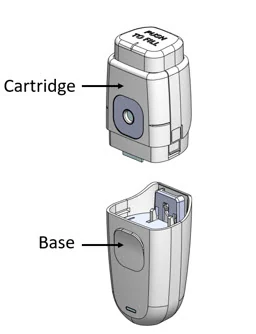
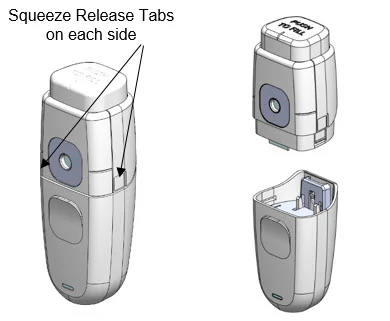
MydCombi™ is packaged in a dispenser that mists drug solution onto the eye. It has 2 parts – the cartridge that holds the drug solution, and the base that holds electronics.
Getting to know MydCombi™
| MydCombi™ Dispenser Parts | MydCombi™ Assembled |
 |  |
How the MydCombi™ Dispenser Works
- The MydCombi™ Cartridge holds the drug solution.
- The MydCombi™ Base supplies power to the dispenser.
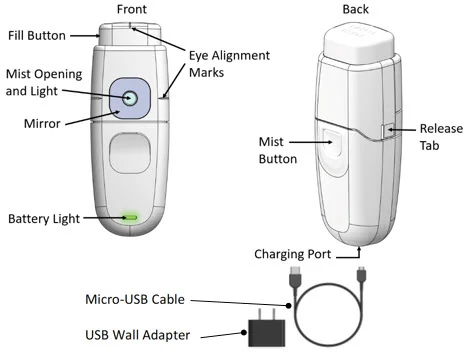
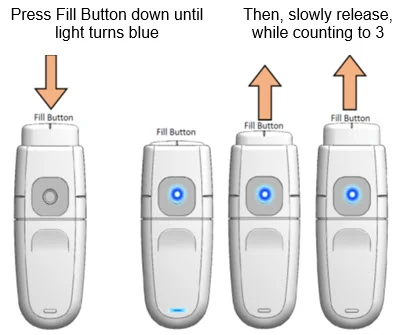
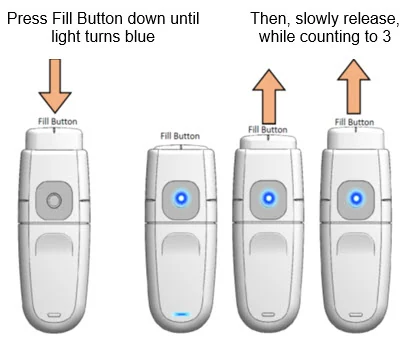
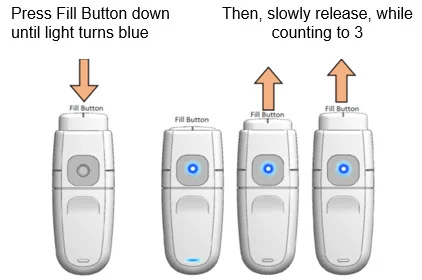
- The Fill Button is pressed to load the drug solution for topical ophthalmic administration.
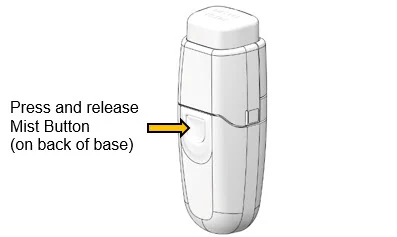
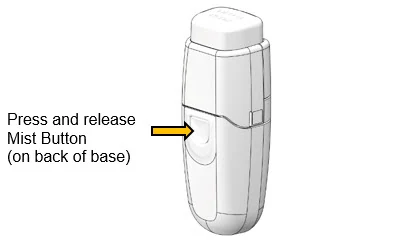
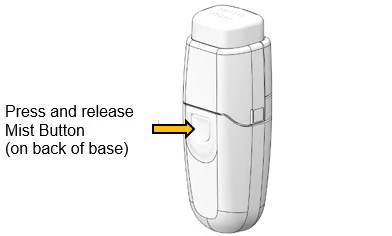
- The Mist Opening is where drug solution comes out when the Mist Button is pressed.
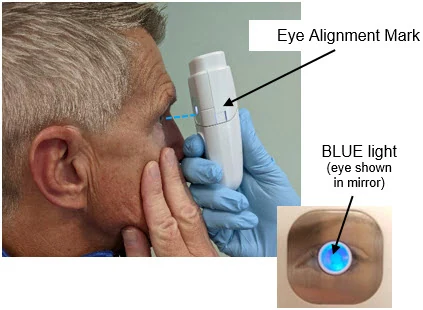
- The Light and Mirror around the Mist Opening and the Eye Alignment Marks on the top and each side of the cartridge help align the eye for drug administration.
- The Battery Light shows how much electrical charge remains in the Base.
- The Release Tabs on each side of the cartridge are used to separate the cartridge and base when replacing cartridges.
- The MydCombi™ Base is charged using a Micro-USB to USB Cable with Wall Plug or USB port (supplied separately). See "MydCombi™ Base Charging and Electrical Information" .
Understanding the Mist and Battery Lights
The Mist Light and the Battery Light show the status of the MydCombi™ dispenser.
| What the Mist and Battery Lights Mean | ||
|---|---|---|
| If you see… | It means… | |
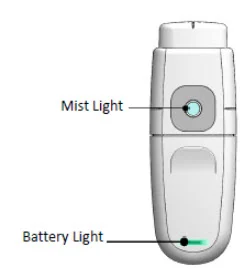 | Mist Light SOLID BLUE | Ready to dose |
| Mist Light BLINKING BLUE with Battery Light BLINKING RED & BLUE | Reset the dispenser
If lights continue blinking after dispenser reset, reset again. If lights continue to blink after second reset, change the cartridge. | |
| Battery Light BLINKING GREEN | Battery is charging | |
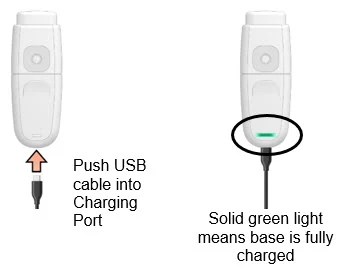
| Battery Light SOLID GREEN | Battery is fully charged | |
| Battery Light BLINKING RED | Battery is low | |
| Battery Light SOLID RED | Charge dispenser base at once | |
Important Reminders and Cleaning Instructions
- Wash hands prior to using MydCombi™.
- Before each use, the exterior (including the mirror surface) of the dispenser should be cleaned using a 70% isopropyl alcohol (IPA) wipe or a clean dust-free, cotton cloth dampened with 70% IPA solution.
- Wipe the exterior for 3 minutes. While wiping, pay close attention to all cracks, crevices, and any other hard to reach areas. Additional wipes may be used as needed. Allow the exterior to air dry. Only manual, non-immersion cleaning as described should be used for the dispenser. Do not autoclave (steam sterilize) or immerse in cleaning fluids. Always disconnect power supply from source before cleaning.
- If the patient wears soft contact lenses, they should be removed at least 10 minutes before drug administration.
- If the patient uses artificial tears, they should not be administered within 10 minutes of drug administration.
- Each MydCombi™ cartridge holds approximately 180 sprays.
- Only use the MydCombi™ cartridge with the MydCombi™ base. The MydCombi™ base will not work with any other type of cartridges.
- See " MydCombi™ Base Charging and Electrical Information" contained with MydCombi™ for complete instruction on charging and applicable electrical information.
Storing the MydCombi™ Base and Cartridges
Store MydCombi™ bases and cartridges at room temperature 15°C to 25°C (59°F to 77°F). Protect from light and excessive heat.
- Do not heat or freeze the MydCombi™ base or cartridge.
- Do not expose MydCombi™ base to fluids.
- Do not tamper with or try to open the MydCombi™ cartridge or base. Doing so could cause damage and result in personal injury.
The MydCombi™ base contains a lithium-ion battery. Damage to the base can cause fire. Do not puncture base or expose to excessive heat (≥ 50°C).
Li-Ion batteries may pose environmental and safety hazards and should be disposed of in accordance with all applicable Federal and State Laws. Check with all governing travel bodies for current requirements before air travel.
Assembling the MydCombi™ Dispenser
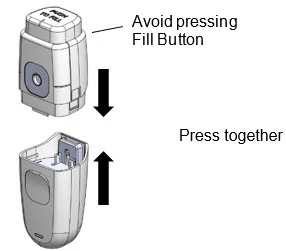
Complete these steps to assemble the MydCombi™ base and cartridge.
Note: If packaging is opened or damaged, do not use the contents. Instead, open a new base or cartridge, and contact your distributer for a replacement.
 |
|
 |
|
 |
|
 |
|
Preparing MydCombi™ for Use Each Day
| Important: A test mist must be performed each day before dosing is commenced. | |
 |
|
 |
|
Administering MydCombi™
| Important: Keep MydCombi™ dispenser upright during use to maintain dose volume. | |
 |
|
 |
|
 |
|
Troubleshooting Tips
- 1. If no mist comes out when Mist Button is pressed, confirm Fill Button has been pressed down completely, and has returned to the "up" position.
- 2.
If solution is not administered within 1 minute after loading, it will be automatically discharged - the MIST Light will blink blue while the Battery Light blinks red and blue. The MydCombi™ dispenser must be reset using the steps below.
To reset dispenser:
- Press and release Mist Button.
- Press and release Fill Button.
- Press and release Mist Button again.
- Reload solution (Step 1 [page 9]).
To report suspected adverse reactions please contact Eyenovia, Inc at 1-833-393-6684 (Option 1) or FDA at 1-800-FDA-1088 or http://www.fda.gov/medwatch.
Replacing the MydCombi™ Cartridge
 |
|
| Symbols Used in Labels on the MydCombi™ Cartridge, Base and Packaging |
| SYMBOL | DEFINITION | SYMBOL | DEFINITION | |
|---|---|---|---|---|
 | CAUTION, CONSULT ACCOMPANYING DOCUMENTS |  | USE BY (YYYY-MM: YEAR-MONTH) | |
 | SEE INSTRUCTIONS FOR USE |  | STERILIZED USING ETHYLENE OXIDE | |
 | CATALOG NUMBER |  | NON-STERILE | |
 | BATCH CODE |  | DO NOT RESTERILIZE | |
 | QUANTITY |  | LITHIUM-ION BATTERY - TO BE APPROPRIATELY RECYCLED | |
 | DATE OF MANUFACTURE (YYYY-MM : YEAR-MONTH) |  | KEEP DRY | |
 | MANUFACTURER |  | GHS LITHIUM-ION DISPOSAL | |
 | DO NOT USE IF THE PACKAGING HAS BEEN OPENED OR DAMAGED |  | ELECTRONIC EQUIPMENT. DO NOT THROW IN TRASH. | |
 | WARNING: ELECTRICITY |  | BY PRESCRIPTION ONLY | |
 | PROTECTED AGAINST VERTICALLY FALLING WATER DROPS UP TO 15-DEGREE ANGLE |  | TYPE BF PART COMPLYING WITH IEC 60601-1 |
Manufactured By:
Eyenovia
295 Madison Ave., Suite 2400
New York, NY 10017
© 2022 Eyenovia, Inc. All rights reserved.
Mydcombi™ Base
Charging and Electrical Information
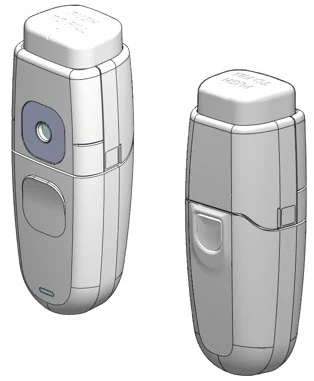
Table of Contents
| 3 |
| 4 |
| 5 |
| 7 |
| 7 |
| 7 |
| 8 |
1. Charging the Mydcombi™ Base
NOTE: Do not use base if packaging is opened or damaged. Get a new package by contacting your Eyenovia sales representative or calling 1-833-393-6684 (choose Option 1).
| Type of Charger: Micro-USB to USB Cable with Wall Plug or USB port (see section 2 for specifications) | ||
| Charge Mydcombi™ Base Before First Use | ||
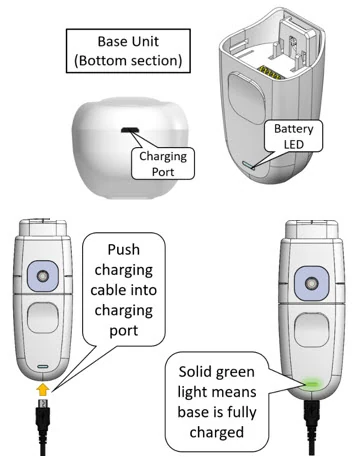 | Charging may be performed either before or after assembly with Mydcombi™ cartridge. Refer to "Instructions for Use - Mydcombi™ Ophthalmic Spray" for information on cartridge/base assembly and drug administration. Perform the following steps to charge base:
Note: Excessive charging may damage battery or decrease battery life. Charging weekly, or when the LED light begins blinking red (signaling low battery), is recommended. | |
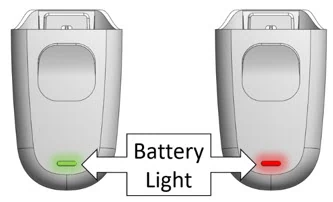
| Battery Indicators on Mydcombi™ Base | ||
 | If Battery Light is… | It means… |
| BLINKING GREEN | Battery is charging | |
| SOLID GREEN | Battery is fully charged | |
| BLINKING RED | Battery is low | |
| SOLID RED | Charge base at once | |
2. Specifications for Mydcombi Base and Charger
Base Specifications
| Parameter | Specifications |
|---|---|
| Operating power | 4.1VDC |
| Power source | Internally powered, Lithium-Ion Battery |
| Instrument make / model | Eyenovia / Mydcombi™ Base |
| Dimensions | 50 length, 120mm height, 40mm width (When assembled with cartridge) |
| Weight (system) | < 100g (When assembled with cartridge) |
| Allowed operating temperature range | 15°C to 25°C (59°F to 77°F) |
| Allowed shipping and storage temperature range | 15°C to 25°C (59°F to 77°F) at relative humidity of 15% to 90% RH, non-condensing |
| Allowed operation, storage, and shipping humidity range | 15°C to 25°C (59°F to 77°F) at relative humidity of 15% to 90% RH, non-condensing |
| Allowed operation, storage, and shipping atmospheric pressure | 700hPa to 1060hPa |
| Electrical shock protection - Classification / Degree | Internally powered Class I |
| Battery life | 2-4 weeks, if used as indicated. |
| Use Life | Do not use base longer than 12 months from date of first use, or after Use By Date |
| Software version | Software version number can be obtained by calling the manufacturer. |
Charger Specifications (Micro-USB to USB Cable with Wall Plug or USB port)
| Parameter | Specifications |
|---|---|
| Type | Switching Power Supply |
| Input | 100-240V~, 50/60 Hz 200mA |
| Output | 5V, 1A |
| USB Cable Minimum Requirements | 5V, 1A |
USB cable must be UL Listed. Must meet US Standard Level VI energy efficiency. Must meet DOE & CEC regulatory requirements. Examples of acceptable cables include those with UL number E178074 or Homespot Model S005AYU0500100. | |
3. EMC
This device has been tested and found to comply with the limits for a Class B digital device, pursuant to part 15 of the FCC Rules. These limits are designed to provide reasonable protection against harmful interference in professional medical equipment. This equipment generates, uses, and radiates radio frequency energy and, if not prepared and used in accordance with instructions, may cause harmful interference to radio communications. There is no guarantee, however, that interference will not occur in a particular setting. If this device does cause harmful interference to radio or television reception, which can be determined by turning the device off/on, the user is encouraged to try to correct the interference by one or more of the following measures:
- Reorient or relocate the receiving antenna
- Increase the separation between the device and receiver
- Connect the device into an outlet on a circuit different from that to which the receiver is connected
- Consult the dealer or an experienced radio/TV technician for help
Note: Changes or modifications not expressly approved by the party responsible for compliance could void the user's authority to operate the device.
Guidance and Manufacturer's Declaration
This device is intended for use in the electromagnetic environment specified below. The device user should assure use in such an environment.
| Electromagnetic emissions | |||
| Emissions Test | Compliance | ||
| RF emissions CISPR 11 | Group 1 | ||
| RF emissions CISPR 11 | Class B | ||
| Harmonic Emissions IEC 61000-3-2 | Class B | ||
| Voltage Fluctuations/Flicker emissions IEC 61000-3-3 | Complies | ||
| Electromagnetic immunity | |||
| Phenomena of a continuous nature | Shall operate as intended. Shall be no degradation of performance. Shall be no loss of function. | ||
| Phenomena of transient nature | Functions shall be self-recoverable. Shall operate as intended after recovering. Shall be no degradation of performance, | ||
| Power interruption exceeding a certain time | Functions shall be recoverable by the operator. Shall operate as intended after recovering. Shall be no degradation of performance. | ||
| Immunity Test | IEC 60601 Test Level | Compliance Level | |
| Electrostatic fast transient/burst IEC 61000-4-4 (Charging Only) | ±2 kV for power supply lines | ±2 kV for power supply lines | |
| Surge IEC 61000-4-5 EN/IEC 61000-4-3 L-N (Charging Only) | ±1 kV differential mode | ±1 kV differential mode | |
| EN/IEC 61000-4-3 (Charging Only) | Radiated Immunity 3 V/m, 80 – 2700 MHz 80% AM at 1 kHz & Proximity Fields from RF Wireless Communications Equipment | Radiated Immunity 3 V/m, 80 – 2700 MHz 80% AM at 1 kHz & Proximity Fields from RF Wireless Communications Equipment | |
| Voltage dips, short interruptions, and voltage variations on power supply input lines IEC 61000-4-11 | Voltage Dips 30% reduction, 25/30 periods At 0° | Voltage Dips 30% reduction, 25/30 periods At 0° | |
Voltage Dips > 95% reduction, 0.5 period At 0°, 45°, 90°, 135°, 180°, 225°, 270°, and 315° | Voltage Dips > 95% reduction, 0.5 period At 0°, 45°, 90°, 135°, 180°, 225°, 270°, and 315° | ||
Voltage Dips > 95 reduction, 1 period At 0° | Voltage Dips > 95 reduction, 1 period At 0° | ||
| Voltage Interruptions > 95% reduction, 250/300 periods | Voltage Interruptions > 95% reduction, 250/300 periods | ||
| Conducted RF EN/IEC 61000-4-6 | Continuous Conducted RF, 80% AM (1 kHz) 3 Vrms, 0.15-80 MHz 6 Vrms in ISM and amateur radio Bands within 150kHz – 80MHz | Continuous Conducted RF, 80% AM (1 kHz) 3 Vrms, 0.15-80 MHz 6 Vrms in ISM and amateur radio Bands within 150kHz – 80MHz | |
| Magnetic field IEC 61000-4-8 | Power Frequency Magnetic Field 30Arms/m at 50/60Hz | Power Frequency Magnetic Field 30Arms/m at 50/60Hz | |
| Immunity to RF Wireless Communications Equipment | ||||||
|---|---|---|---|---|---|---|
| Test Frequency (MHz) | Band For some services, only uplink frequencies are included. (MHz) | Service | Modulation The carrier shall be modulated using a 50% duty cycle square wave signal. | Max. Power (W) | Distance (m) | Immunity test level (V/m) |
| 385 | 380 –390 | TETRA 400 | Pulse 18 Hz | 1.8 | 0.3 | 27 |
| 450 | 430 – 470 | GMRS 460, FRS 460 | FM As an alternative to FM modulation, 50% pulse modulation at 18 Hz may be used because, while it does not represent actual modulation, it would be worst case. ± 5 kHz Deviation 1 kHz sine | 2 | 0.3 | 28 |
| 710 | 704 – 787 | LTE Band 13, 17 | Pulse 217 Hz | 0.2 | 0.3 | 9 |
| 745 | ||||||
| 780 | ||||||
| 810 | 800 – 960 | GSM 800/900, TETRA 800, iDEN 820, CDMA 850, LTE Band 5 | Pulse 18 Hz | 2 | 0.3 | 28 |
| 870 | ||||||
| 930 | ||||||
| 1720 | 1 700 – 1 990 | GSM 1800; CDMA 1900; GSM 1900; DECT; LTE Band 1, 3, 4, 25; UMTS | Pulse 217 Hz | 2 | 0.3 | 28 |
| 1845 | ||||||
| 1970 | ||||||
| 2450 | 2 400 – 2 570 | Bluetooth, WLAN, 802.11 b/g/n, RFID 2450, LTE Band 7 | Pulse 217 Hz | 2 | 0.3 | 28 |
| 5240 | 5 100 – 5 800 | WLAN 802.11 a/n | Pulse 217 Hz | 0.2 | 0.3 | 9 |
| 5500 | ||||||
| 5785 | ||||||
| Recommended separation distances between portable and mobile RF communications equipment and the device, except for the distances indicated in the following table "Immunity to RF Wireless Communications Equipment". | |||
| The device is intended for use in an electromagnetic environment in which radiated RF disturbances are controlled. Users can help prevent electromagnetic interference by maintaining a minimum distance between portable and mobile RF communications equipment (transmitters) and the device as recommended below, according to the maximum output power of the communications equipment. | |||
| Rated maximum output power of transmitter (W) | Separation distance according to frequency of transmitter (m) | ||
| 150 kHz to 80 MHz d = 1.2√P | 80 MHz to 800 MHz d = 1.2√P | 800 MHz to 2.7 GHz d = 2.3√P | |
| 0.01 | 0.12 | 0.12 | 0.23 |
| 0.1 | 0.38 | 0.38 | 0.73 |
| 1 | 1.2 | 1.2 | 2.3 |
| 10 | 3.8 | 3.8 | 7.3 |
| 100 | 12 | 12 | 23 |
For transmitters rated at a maximum output power not listed above, the recommended separation distance d in meters (m) can be estimated using the equation applicable to the frequency of the transmitter, where P is the maximum output power rating of the transmitter in watts (W) according to the transmitter manufacturer. NOTE: At 80 MHz and 800 MHz, the separation distance for the higher frequency range applies. NOTE: These guidelines may not apply in all situations. Electromagnetic propagation is affected by absorption and reflection from structures, objects, and people. | |||
4. Disposal
Contains Lithium-Ion Battery
Lithium-Ion batteries may pose environmental and safety hazards and should be disposed of in accordance with all applicable Federal and State laws.
Electronic Equipment
Base should be properly disposed of in accordance with all applicable State and Federal laws.
5. Notes on Safety
Warnings and Recommendations
Contains Lithium-Ion Battery
Damage can cause fire. Do not puncture. Do not expose to excessive heat (≥ 50°C).
Do not use after expiration date
Expiration date is published on base label. Discontinue use if expiration date has passed.
Inspect for device damage
Do not use if package has been opened or damaged or if there is evidence of base damage. Doing so could result in injury.
Tampering with parts in the Mydcombi™ Base
Do not tamper with or attempt to open the base. Doing so could cause damage and result in personal injury.
Risk of usage
Failure to use base in accordance with instructions could affect dose dispensation. Keep base in upright position during use. If base has been idling for an extended period, dispense a waste spray. Optejet will not dispense drug while the base is actively charging.
Risk due to insufficient user training
Use base only with Mydcombi™ Cartridge. Refer to "Instructions for Use - Mydcombi™ Ophthalmic Spray".
Risk due to battery leakage
Do not use base if there is any sign of battery leakage.
Keep dry
Do not expose base to fluids; keep dry.
Transportation and Storage
Do not store or transport base with sharp or metallic objects.
Risk of electrical leakage
Non-hazardous voltage is present during normal use.
- Do not use with other equipment
Do not use with non-certified USB charger
Recharge base using a micro-USB cable (not included). Use of a charger other than that specified in Section 2 - Specifications could result in increased electromagnetic emissions or decreased electromagnetic immunity of the base, resulting in improper operation.
CAUTION – For professional use
Federal law restricts this device to sale by or on the order of a physician (21 CFR§801.109(b)(1)).
CAUTION – Radiation emission
This device emits electromagnetic radiation.
6. Reporting to Manufacturer and Authorities
If a serious incident occurs in connection with this device that affects the user or another person, please report incident to Eyenovia by calling 1-833-393-6684 (choose Option 1) or FDA at 1-800-FDA-1088 or http://www.fda.gov/medwatch.
7. Symbols Used in Labels on Mydcombi™ Base and Packaging
| SYMBOL | DEFINITION | SYMBOL | DEFINITION | |
|---|---|---|---|---|
 | CAUTION, CONSULT ACCOMPANYING DOCUMENTS |  | USE BY (YYYY-MM: YEAR-MONTH) | |
 | SEE INSTRUCTIONS FOR USE |  | ELECTRONIC EQUIPMENT. DO NOT THROW IN TRASH. | |
 | CATALOG NUMBER |  | NON-STERILE | |
 | BATCH CODE |  | KEEP DRY | |
 | QUANTITY |  | LITHIUM-ION BATTERY - TO BE APPROPRIATELY RECYCLED | |
 | DATE OF MANUFACTURE (YYYY-MM : YEAR-MONTH) |  | MANUFACTURER | |
 | WARNING: ELECTRICITY |  | CAUTION: FEDERAL LAW RESTRICTS THIS PRODUCT | |
 | PROTECTED AGAINST VERTICALLY FALLING WATER DROPS UP TO 15-DEGREE ANGLE |  | TYPE BF PART COMPLYING WITH IEC 60601-1 |
| MANUFACTURED BY | Contact / Return Goods Policy |
|---|---|
Eyenovia, Inc. 8748 Technology Way, Reno, NV 89521 © 2022 Eyenovia, Inc. All rights reserved. www.eyenovia.com | Contact your sales representative or Eyenovia for product returns. Call 1-833-EYENOVIA (393-6684) admin@eyenovia.com |