


Patient information: uses, side effects, how to take - Insulin Glargine
What is Insulin Glargine, U-300?
- Insulin Glargine, U-300 is a long-acting man-made insulin used to control high blood sugar in adults and children who are 6 years of age and older with diabetes mellitus.
- Insulin Glargine, U-300 is not for the treatment of diabetic ketoacidosis.
It is not known if Insulin Glargine, U-300 is safe and effective in children under 6 years of age.
Who should not use Insulin Glargine, U-300?
Do not use Insulin Glargine, U-300 if you:
- are having an episode of low blood sugar (hypoglycemia).
- have an allergy to insulin glargine or any of the ingredients in Insulin Glargine, U-300. See the end of this Patient Information leaflet for a complete list of ingredients in Insulin Glargine, U-300.
What should I tell my healthcare provider before using Insulin Glargine, U-300?
Before using Insulin Glargine, U-300, tell your healthcare provider about all your medical conditions, including if you:
- have liver or kidney problems.
- take other medicines, especially ones called TZDs (thiazolidinediones).
- have heart failure or other heart problems. If you have heart failure, it may get worse while you take TZDs with Insulin Glargine, U-300.
- are pregnant, planning to become pregnant, or are breastfeeding. It is not known if Insulin Glargine, U-300 may harm your unborn or breastfeeding baby.
Tell your healthcare provider about all the medicines you take, including prescription and over-the-counter medicines, vitamins, and herbal supplements.
Before you start using Insulin Glargine, U-300, talk to your healthcare provider about low blood sugar and how to manage it.
How should I use Insulin Glargine, U-300?
- Insulin Glargine, U-300 is available in 2 single-patient-use prefilled pens: Insulin Glargine, U-300 SoloStar and Insulin Glargine, U-300 Max SoloStar. Your healthcare provider will tell you which Insulin Glargine, U-300 Pen is right for you.
- Read the detailed Instructions for Use that come with your Insulin Glargine, U-300 SoloStar or Insulin Glargine, U-300 Max SoloStar single-patient-use prefilled pen.
- Use Insulin Glargine, U-300 exactly as your healthcare provider tells you to. Your healthcare provider should tell you how much Insulin Glargine, U-300 to use and when to use it.
- Know the amount of Insulin Glargine, U-300 you use. Do not change the amount of Insulin Glargine, U-300 you use unless your healthcare provider tells you to.
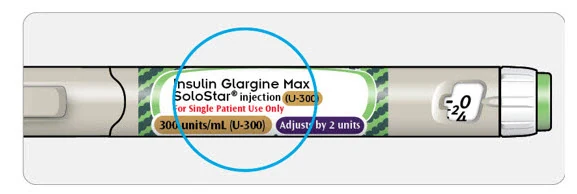
- Check your insulin label each time you give your injection to make sure you are using the correct insulin.
- Do not use a syringe to remove Insulin Glargine, U-300 from your Insulin Glargine, U-300 SoloStar or Insulin Glargine, U-300 Max SoloStar single-patient-use prefilled pen. This can cause you to give yourself too much insulin. Insulin Glargine, U-300 has 3 times as much insulin (300 units/mL) in 1 mL as compared to insulin glargine (U-100 units/mL) pens.
- Do not re-use needles. Always use a new needle for each injection. Reusing needles increases your chance of having blocked needles, which can cause you to get the wrong dose of Insulin Glargine, U-300. Using a new needle for each injection also lowers your risk of getting an infection. If your needle is blocked, follow the instructions in Step 3 of the Instructions for Use.
- Insulin Glargine, U-300 should be used 1 time each day and at the same time each day.
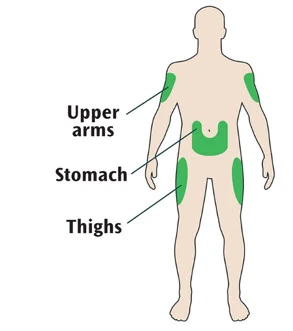
- Insulin Glargine, U-300 is injected under the skin (subcutaneously) of your upper legs (thighs), upper arms, or stomach area (abdomen).
- Do not use Insulin Glargine, U-300 in an insulin pump or inject Insulin Glargine, U-300 into your vein (intravenously).
Change (rotate) your injection sites within the area you choose with each dose to reduce your risk of getting pits or thickening of the skin (lipodystrophy) and lumps in the skin (localized cutaneous amyloidosis) at the injection sites.
- Do not use the exact same spot for each injection.
- Do not inject where the skin has pits, is thickened, or has lumps.
- Do not inject where the skin is tender, bruised, scaly or hard, or into scars or damaged skin.
- Do not mix Insulin Glargine, U-300 with any other type of insulin or liquid medicine.
- Check your blood sugar levels. Ask your healthcare provider what your blood sugar should be and when you should check your blood sugar levels.
Keep Insulin Glargine, U-300 and all medicines out of the reach of children.
Your dose of Insulin Glargine, U-300 may need to change because of:
- a change in level of physical activity or exercise, weight gain or loss, increased stress, illness, change in diet, or because of other medicines you take.
What should I avoid while using Insulin Glargine, U-300?
While using Insulin Glargine, U-300 do not:
- drive or operate heavy machinery, until you know how Insulin Glargine, U-300 affects you.
- drink alcohol or use over-the-counter medicines that contain alcohol.
What are the possible side effects of Insulin Glargine, U-300?
Insulin Glargine, U-300 may cause serious side effects that can lead to death, including:
low blood sugar (hypoglycemia). Signs and symptoms that may indicate low blood sugar include:
- dizziness or light-headedness, sweating, confusion, headache, blurred vision, slurred speech, shakiness, fast heartbeat, anxiety, irritability or mood change, and hunger.
severe allergic reaction (whole body reaction). Get medical help right away if you have any of these signs or symptoms of a severe allergic reaction:
- a rash over your whole body, trouble breathing, a fast heartbeat, or sweating.
- low potassium in your blood (hypokalemia).
heart failure. Taking certain diabetes pills called TZDs (thiazolidinediones) with Insulin Glargine, U-300 may cause heart failure in some people. This can happen even if you have never had heart failure or heart problems before. If you already have heart failure it may get worse while you take TZDs with Insulin Glargine, U-300. Your healthcare provider should monitor you closely while you are taking TZDs with Insulin Glargine, U-300. Tell your healthcare provider if you have any new or worse symptoms of heart failure including:
- shortness of breath, swelling of your ankles or feet, sudden weight gain.
Treatment with TZDs and Insulin Glargine, U-300 may need to be changed or stopped by your healthcare provider if you have new or worse heart failure.
Get emergency medical help if you have:
- trouble breathing, shortness of breath, fast heartbeat, swelling of your face, tongue, or throat, sweating, extreme drowsiness, dizziness, confusion.
The most common side effects of Insulin Glargine, U-300 include:
- low blood sugar (hypoglycemia), weight gain, itching, rash, swelling, allergic reactions, including reactions at your injection site, skin thickening or pits at the injection site (lipodystrophy).
These are not all the possible side effects of Insulin Glargine, U-300. Call your doctor for medical advice about side effects. You may report side effects to FDA at 1-800-FDA-1088.
General information about the safe and effective use of Insulin Glargine, U-300.
Medicines are sometimes prescribed for purposes other than those listed in a Patient Information leaflet. Do not use Insulin Glargine, U-300 for a condition for which it was not prescribed. Do not give Insulin Glargine, U-300 to other people, even if they have the same symptoms that you have. It may harm them.
This Patient Information leaflet summarizes the most important information about Insulin Glargine, U-300. If you would like more information, talk with your healthcare provider. You can ask your pharmacist or healthcare provider for information about Insulin Glargine, U-300 that is written for health professionals.
What are the ingredients in Insulin Glargine, U-300?
- Active ingredient: insulin glargine
- Inactive ingredients: glycerin, metacresol, zinc and Water for Injection, USP. Hydrochloric acid and sodium hydroxide may be added to adjust the pH.
Manufactured by: sanofi-aventis U.S. LLC, Morristown, NJ 07960, U.S. License No. 1752
Manufactured for: Winthrop U.S., a business of sanofi-aventis U.S., LLC, Morristown, NJ 07960, A SANOFI COMPANY
For more information about Insulin glargine call 1-800-633-1610 or go to www.winthropus.com.
Instructions for Use
Insulin Glargine, U-300 SoloStar® [IN-suh-lin GLAR-jeen]
injection, for subcutaneous use
300 units/mL (U-300)
1.5 mL single-patient-use prefilled pen
This product is TOUJEO® (insulin glargine).
Read this first
Do not share your Insulin Glargine, U-300 SoloStar pen with other people, even if the needle has been changed. You may give other people a serious infection, or get a serious infection from them.
Insulin Glargine, U-300 contains 300 units/mL of insulin glargine
- Do not re-use needles. If you do, you might not get your dose (underdosing) or get too much (overdosing) as the needle could block.
- Do not use a syringe to remove insulin from your pen. If you do, you will get too much insulin. The scale on most syringes is made for U-100 (non-concentrated) insulin only.
- The dose selector of your Insulin Glargine, U-300 SoloStar pen dials by 1 unit.
People who are blind or have vision problems should not use the Insulin Glargine, U-300 SoloStar pen without help from a person trained to use the Insulin Glargine, U-300 SoloStar pen.
Important information
- Do not use your pen if it is damaged or if you are not sure that it is working properly.
- Always perform a safety test (see Step 3 ).
- Always carry a spare pen and spare needles in case they are lost or stop working.
- Change (rotate) your injection sites within the area you choose for each dose (see "Places to inject").
Learn to inject
- Talk with your healthcare provider about how to inject, before using your pen.
- Read all of these instructions before using your pen. If you do not follow all of these instructions, you may get too much or too little insulin.
Need help?
If you have any questions about your pen or about diabetes, ask your healthcare provider, go to www.winthropus.com or call sanofi-aventis at 1-800-633-1610.
Extra items you will need:
- a new sterile needle (not included with the pen) (see Step 2 ).
- an alcohol swab.
- a puncture-resistant container for used needles and pens (see "Throwing your pen away").
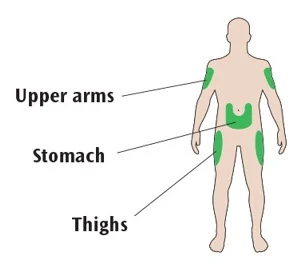
Places to inject
- Inject your insulin exactly as your healthcare provider has shown you.
- Inject your insulin under the skin (subcutaneously) of your upper legs (thighs), upper arms, or stomach area (abdomen).
- Change (rotate) your injection sites within the area you choose for each dose to reduce your risk of getting pits or thickening of the skin (lipodystrophy) and lumps in the skin (localized cutaneous amyloidosis) at the injection sites.
- Do not inject where the skin has pits, is thickened, or has lumps.
- Do not inject where the skin is tender, bruised, scaly or hard, or into scars or damaged skin.
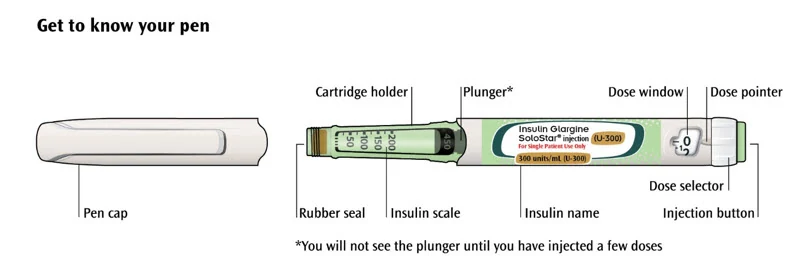
Get to know your pen
Step 1: Check your pen
Take a new pen out of the refrigerator at least 1 hour before you inject. Cold insulin is more painful to inject.
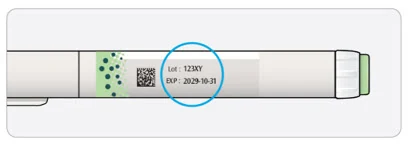
1A Check the name and expiration date on the label of your pen.
Make sure you have the correct insulin.
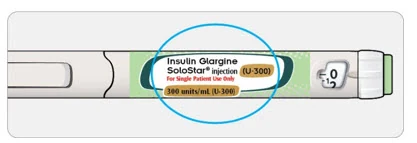
Do not use your pen after the expiration date printed on the label.
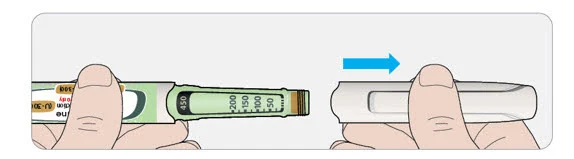
1B Pull off the pen cap.
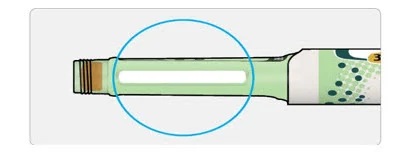
1C Check that the insulin is clear.
- Do not use the pen if the insulin looks cloudy, colored or contains particles.
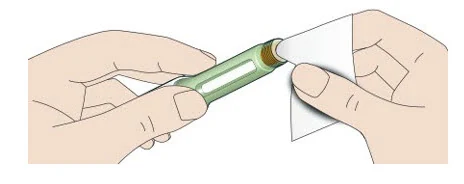
1D Wipe the rubber seal with an alcohol swab.
If you have other injector pens
- Making sure you have the correct medicine is especially important if you have other injector pens.
Step 2: Attach a new needle
- Do not re-use needles. Always use a new sterile needle for each injection. This helps stop blocked needles, contamination and infection.
- Always use needles from BD (such as BD Ultra-Fine®), Ypsomed (such as Clickfine®), or Owen Mumford (such as Unifine® Pentips®).
2A Take a new needle and peel off the protective seal.
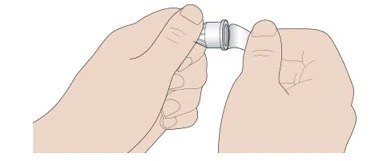
2B Keep the needle straight and screw it onto the pen until fixed. Do not over-tighten.
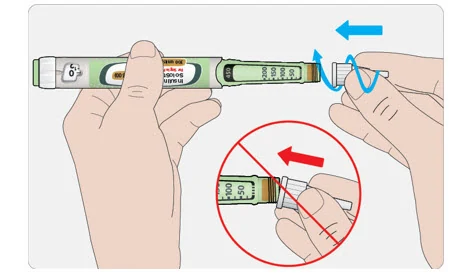
2C Pull off the outer needle cap. Keep this for later.
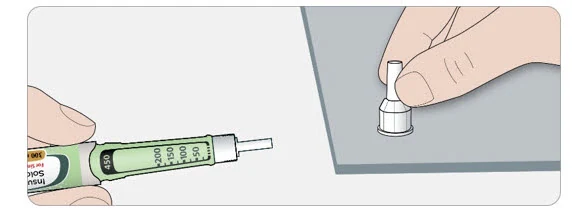
2D Pull off the inner needle cap and throw away.
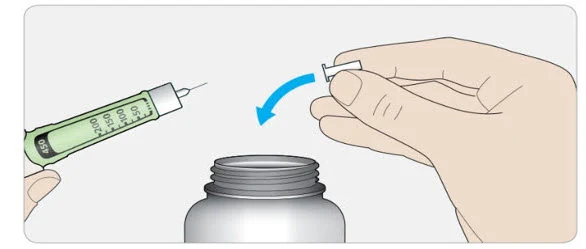
Handling needles
- Be careful when you are handling needles to help prevent accidental needle-stick injury. You may give other people a serious infection, or get a serious infection from them.
Step 3: Do a safety test
Always do a safety test before each injection to:
- check your pen and the needle to make sure they are working properly.
- make sure that you get the correct insulin dose.
If the pen is new, you must perform safety tests before you use the pen for the first time until you see insulin coming out of the needle tip. If you see insulin coming out of the needle tip, the pen is ready to use. If you do not see insulin coming out before taking your dose, you could get an underdose or no insulin at all. This could cause high blood sugar.
3A Select 3 units by turning the dose selector until the dose pointer is at the mark between 2 and 4.
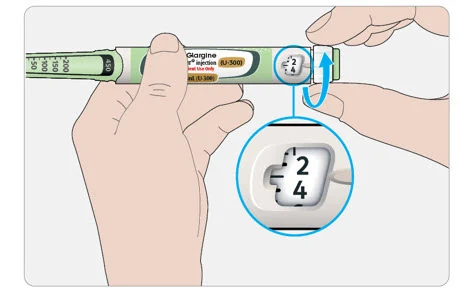
3B Press the injection button all the way in.
- When insulin comes out of the needle tip, your pen is working correctly.
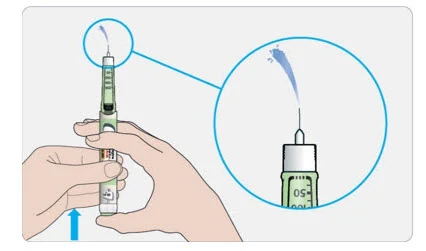
If no insulin appears:
- You may need to repeat this step up to 3 times before seeing insulin.
If no insulin comes out after the third time, the needle may be blocked. If this happens:
- change the needle (see Step 6 and Step 2 ),
- then repeat the safety test (see Step 3 ).
- Do not use your pen if there is still no insulin coming out of the needle tip. Use a new pen.
- Do not use a syringe to remove insulin from your pen.
If you see air bubbles
- You may see air bubbles in the insulin. This is normal, they will not harm you.
Step 4: Select the dose
- Do not select a dose or press the injection button without a needle attached. This may damage your pen.
- Insulin Glargine, U-300 SoloStar is made to deliver the number of insulin units that your healthcare provider prescribed. You do not need to do any dose calculations.
- The dose selector of your Insulin Glargine, U-300 SoloStar pen dials by 1 unit.
4A Make sure a needle is attached and the dose is set to "0."
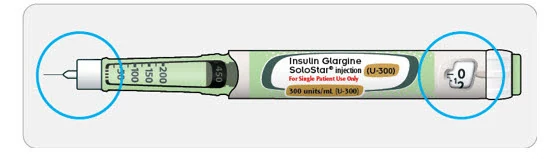
4B Turn the dose selector until the dose pointer lines up with your dose.
- Set the dose by turning the dose selector to a line in the dose window. Each line equals 1 unit.
- The dose selector clicks as you turn it.
- Always check the number in the dose window to make sure you dialed the correct dose.
- Do not dial your dose by counting the clicks. You may dial the wrong dose. This may lead to you getting too much insulin or not enough insulin.
- If you turn past your dose, you can turn back down.
- If there are not enough units left in your pen for your dose, the dose selector will stop at the number of units left.
- If you cannot select your full prescribed dose, split the dose into 2 injections or use a new pen. If you use a new pen, perform a safety test (see Step 3 ).
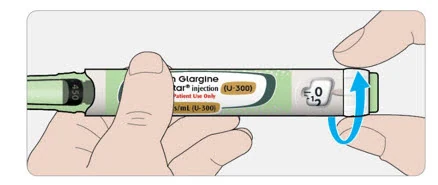
How to read the dose window
The dose selector dials by 1 unit.
Even numbers are shown in line with the dose pointer:
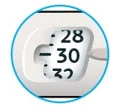 30 units selected |
Odd numbers are shown as a line between even numbers:
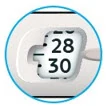 29 units selected |
Units of insulin in your pen
- Your pen contains a total of 450 units of insulin. You can select doses from 1 to 80 units. Each pen contains more than 1 dose.
- You can see roughly how many units of insulin are left by looking at where the plunger is on the insulin scale.
Step 5: Inject your dose
If you find it hard to press the injection button in, do not force it as this may break your pen. See the section below for help.
5A Choose a place to inject as shown in the picture labeled "Places to inject."
- The site you choose for the injection should be clean and dry.
- If your skin is dirty, clean it as instructed by your healthcare provider.
5B Push the needle into your skin as shown by your healthcare provider.
- Do not touch the injection button yet.
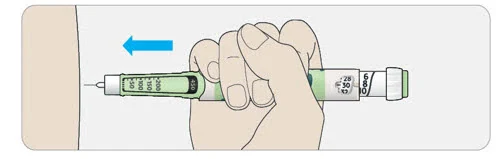
5C Place your thumb on the injection button. Then press all the way in and hold.
- Do not press at an angle. Your thumb could block the dose selector from turning.
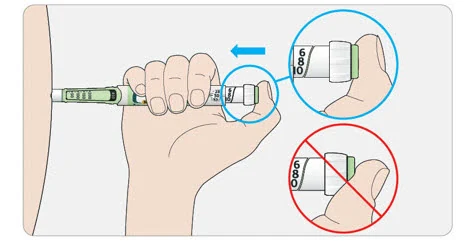
5D Keep the injection button held in and when you see "0" in the dose window, slowly count to 5.
- This will make sure you get your full dose.
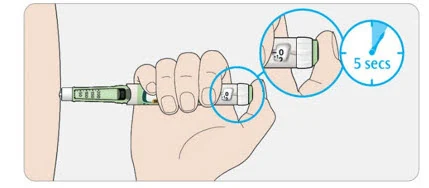
5E After holding and slowly counting to 5, release the injection button. Then remove the needle from your skin.
If you find it hard to press the injection button in:
- Change the needle (see Step 6 and Step 2) then do a safety test (see Step 3).
- If you still find it hard to press in, get a new pen.
- Do not use a syringe to remove insulin from your pen.
Step 6: Remove the needle
- Take care when handling needles to prevent needle injury and cross-infection.
- Do not put the inner needle cap back on.
6A Grip the widest part of the outer needle cap. Keep the needle straight and guide it into the outer needle cap.
Then push firmly on.
- The needle can puncture the cap if it is recapped at an angle.
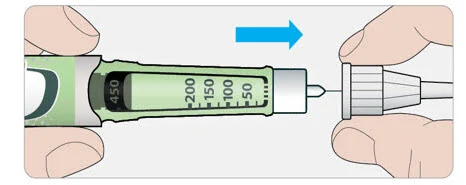
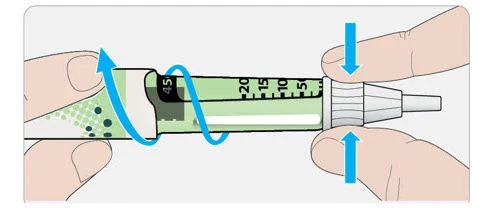
6B Grip and squeeze the widest part of the outer needle cap. Turn your pen several times with your other hand to remove the needle.
- Try again if the needle does not come off the first time.
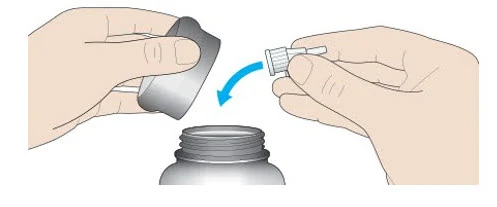
6C Throw away the used needle in a puncture-resistant container (see "Throwing your pen away" at the end of this Instructions for Use).
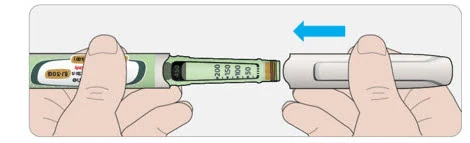
6D Put the pen cap back on.
- Do not put the pen back in the refrigerator.
Use by
- Only use your pen for up to 56 days after its first use.
How to store your pen
Before first use
- Keep new pens in the refrigerator between 36°F and 46°F (2°C and 8°C).
- Do not freeze. Throw away your pen if it has been frozen (See " Throwing your pen away ").
After first use
- Keep your pen at room temperature up to 86°F (30°C).
- Protect your pen from direct heat and light.
- Do not put your pen back in the refrigerator.
- Do not store your pen with the needle attached.
- Store your pen with the pen cap on.
- Keep Insulin Glargine, U-300 SoloStar pens and needles out of the reach of children.
How to care for your pen
Handle your pen with care
- Do not drop your pen or knock it against hard surfaces.
- If you think that your pen may be damaged, do not try to fix it. Use a new one.
Protect your pen from dust and dirt
- You can clean the outside of your pen by wiping it with a damp cloth (water only). Do not soak, wash or lubricate your pen. This may damage it.
Throwing your pen away
- The used Insulin Glargine, U-300 SoloStar pen may be thrown away in your household trash after you have removed the needle.
- Put the used needle in a FDA-cleared sharps disposal container right away after use. Do not throw away (dispose of) needles in your household trash.
If you do not have a FDA-cleared sharps disposal container, you may use a household container that is:
- made of a heavy-duty plastic,
- can be closed with a tight-fitting, puncture-resistant lid, without sharps being able to come out,
- upright and stable during use,
- leak-resistant, and
- properly labeled to warn of hazardous waste inside the container.
- When your sharps disposal container is almost full, you will need to follow your community guidelines for the right way to dispose of your sharps disposal container. There may be state or local laws about how you should throw away used needles and syringes. For more information about safe sharps disposal, and for specific information about sharps disposal in the state that you live in, go to the FDA's website at: http://www.fda.gov/safesharpsdisposal.
- Do not dispose of your used sharps disposal container in your household trash unless your community guidelines permit this. Do not recycle your used sharps disposal container.
Manufactured by:
sanofi-aventis U.S. LLC
Morristown, NJ 07960
U.S. License No. 1752
Manufactured for:
Winthrop U.S.,
A business of sanofi-aventis U.S. LLC
Morristown, NJ 07960A SANOFI COMPANY
©2025 Sanofi. All rights reserved
All trademarks mentioned in this document are the property of the Sanofi group. (with the exception of BD (such as BD Ultra-Fine®), Ypsomed (such as Clickfine®) or Owen Mumford (such as Unifine® Pentips®))
This Instructions for Use has been approved by the U.S. Food and Drug Administration.
Revised: May 2025
Instructions for Use
Insulin Glargine, U-300 Max SoloStar® [IN-suh-lin GLAR-jeen]
injection, for subcutaneous use
300 units/mL (U-300)
3 mL single-patient-use prefilled pen
This product is TOUJEO® (insulin glargine).
Read this first
Do not share your Insulin Glargine, U-300 Max SoloStar pen with other people, even if the needle has been changed. You may give other people a serious infection, or get a serious infection from them.
Insulin Glargine, U-300 contains 300 units/mL of insulin glargine
- Do not re-use needles. If you do, you might not get your dose (underdosing) or get too much (overdosing) as the needle could block.
- Do not use a syringe to remove insulin from your pen. If you do, you will get too much insulin. The scale on most syringes is made for U-100 (non-concentrated) insulin only.
- The dose selector of your Insulin Glargine, U-300 Max SoloStar pen dials by 2 units.
People who are blind or have vision problems should not use the Insulin Glargine, U-300 Max SoloStar pen without help from a person trained to use the Insulin Glargine, U-300 Max SoloStar pen.
Important information
- Do not use your pen if it is damaged or if you are not sure that it is working properly.
- Always perform a safety test (see Step 3 ).
- Always carry a spare pen and spare needles in case they are lost or stop working.
- Change (rotate) your injection sites within the area you choose for each dose (see "Places to inject").
Learn to inject
- Talk with your healthcare provider about how to inject, before using your pen.
- Read all of these instructions before using your pen. If you do not follow all of these instructions, you may get too much or too little insulin.
Need help?
If you have any questions about your pen or about diabetes, ask your healthcare provider, go to www.winthropus.com or call sanofi-aventis at 1-800-633-1610.
Extra items you will need:
- a new sterile needle (not included with the pen) (see Step 2 ).
- an alcohol swab.
- a puncture-resistant container for used needles and pens (see "Throwing your pen away").
Places to inject
- Inject your insulin exactly as your healthcare provider has shown you.
- Inject your insulin under the skin (subcutaneously) of your upper legs (thighs), upper arms, or stomach area (abdomen).
- Change (rotate) your injection sites within the area you choose for each dose to reduce your risk of getting pits or thickening of the skin (lipodystrophy) and lumps in the skin (localized cutaneous amyloidosis) at the injection sites.
- Do not inject where the skin has pits, is thickened, or has lumps.
- Do not inject where the skin is tender, bruised, scaly or hard, or into scars or damaged skin.
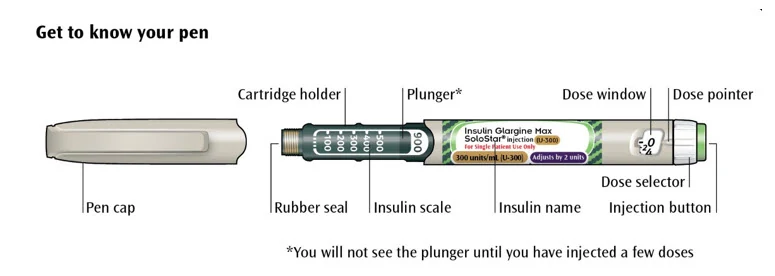
Get to know your pen
Step 1: Check your pen
Take a new pen out of the refrigerator at least 1 hour before you inject. Cold insulin is more painful to inject.
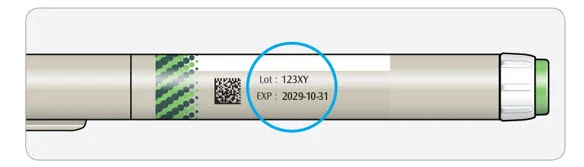
1A Check the name and expiration date on the label of your pen.
- Make sure you have the correct insulin.
- Do not use your pen after the expiration date printed on the label.
1B Pull off the pen cap.
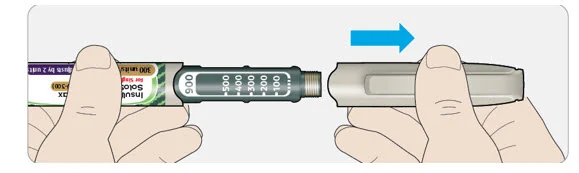
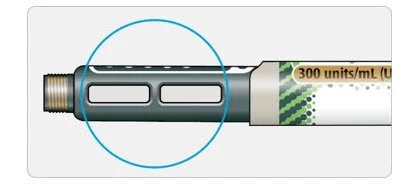
1C Check that the insulin is clear.
- Do not use the pen if the insulin looks cloudy, colored or contains particles.
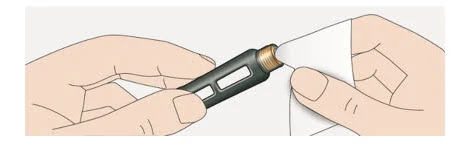
1D Wipe the rubber seal with an alcohol swab.
If you have other injector pens
- Making sure you have the correct medicine is especially important if you have other injector pens.
Step 2: Attach a new needle
- Do not re-use needles. Always use a new sterile needle for each injection. This helps stop blocked needles, contamination and infection.
- Always use needles from BD (such as BD Ultra-Fine®), Ypsomed (such as Clickfine®), or Owen Mumford (such as Unifine® Pentips®) that are 8 mm long or shorter.
2A Take a new needle and peel off the protective seal.
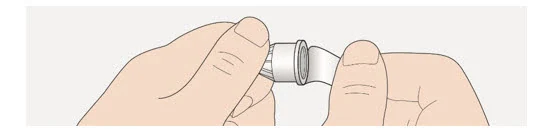
2B Keep the needle straight and screw it onto the pen until fixed. Do not over-tighten.
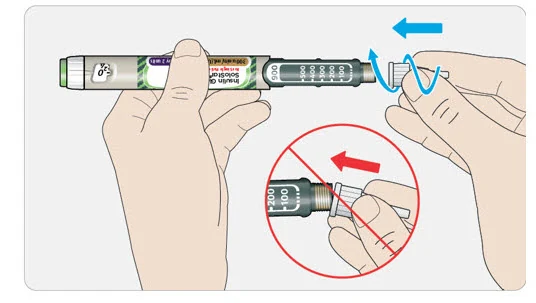
2C Pull off the outer needle cap. Keep this for later.
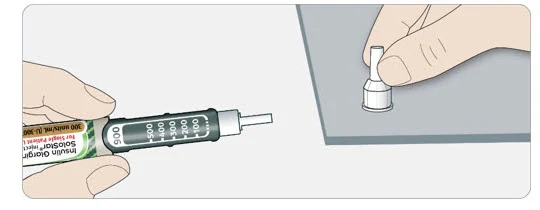
2D Pull off the inner needle cap and throw away.
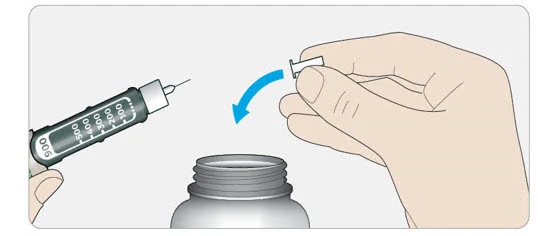
Handling needles
- Be careful when you are handling needles to help prevent accidental needle-stick injury. You may give other people a serious infection, or get a serious infection from them.
Step 3: Do a safety test
Always do a safety test before each injection to:
- check your pen and the needle to make sure they are working properly.
- make sure that you get the correct insulin dose.
If the pen is new, you must perform safety tests before you use the pen for the first time until you see insulin coming out of the needle tip. If you see insulin coming out of the needle tip, the pen is ready to use. If you do not see insulin coming out before taking your dose, you could get an underdose or no insulin at all. This could cause high blood sugar.
3A Select 4 units by turning the dose selector until the dose pointer is at the 4 mark.
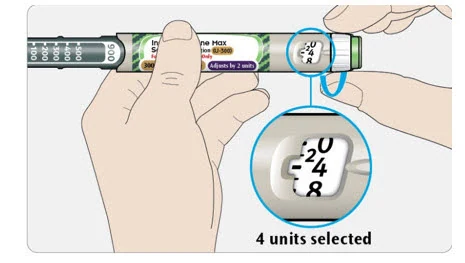
3B Press the injection button all the way in.
- When insulin comes out of the needle tip, your pen is working correctly.
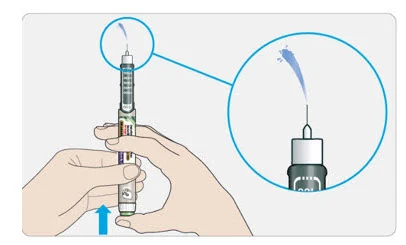
If no insulin appears:
- You may need to repeat this step up to 6 times before seeing insulin.
If no insulin comes out after the sixth time, the needle may be blocked. If this happens:
- change the needle (see Step 6 and Step 2 ),
- then repeat the safety test (see Step 3 ).
- Do not use your pen if there is still no insulin coming out of the needle tip. Use a new pen.
- Do not use a syringe to remove insulin from your pen.
If you see air bubbles
- You may see air bubbles in the insulin. This is normal, they will not harm you.
Step 4: Select the dose
- Do not select a dose or press the injection button without a needle attached. This may damage your pen.
- Insulin Glargine, U-300 Max SoloStar is made to deliver the number of insulin units that your healthcare provider prescribed. You do not need to do any dose calculations.
- The dose selector of your Insulin Glargine, U-300 Max SoloStar pen dials by 2 units and can only dial even doses of insulin.
4A Make sure a needle is attached and the dose is set to "0."
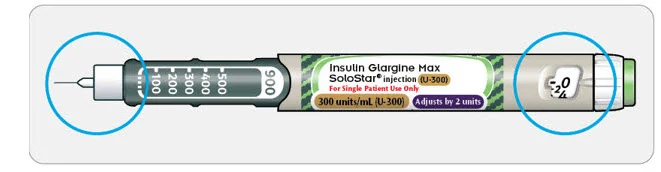
4B Turn the dose selector until the dose pointer lines up with your dose.
- Set the dose by turning the dose selector to a line in the dose window. Each line equals 2 units.
- The dose selector clicks as you turn it.
- Always check the number in the dose window to make sure you dialed the correct dose.
- Do not dial your dose by counting the clicks. You may dial the wrong dose. This may lead to you getting too much insulin or not enough insulin.
- If you turn past your dose, you can turn back down.
- If there are not enough units left in your pen for your dose, the dose selector will stop at the number of units left.
If you cannot select your full prescribed dose, split the dose into 2 injections or use a new pen. If you use a new pen, perform a safety test (see Step 3 )
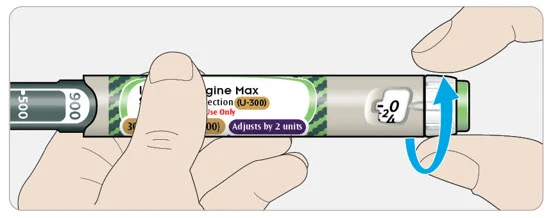
How to read the dose window
The dose selector dials by 2 units.
Each line in the dose window is an even number.
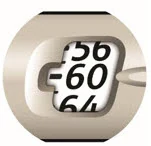 60 units selected |
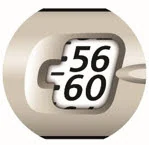 58 units selected |
Units of insulin in your pen
- Your pen contains a total of 900 units of insulin. You can select doses from 2 to 160 units. The dose is adjusted by 2 units at a time. Each pen contains more than 1 dose.
- You can see roughly how many units of insulin are left by looking at where the plunger is on the insulin scale.
Step 5: Inject your dose
If you find it hard to press the injection button in, do not force it as this may break your pen. See the section below for help.
5A Choose a place to inject as shown in the picture labeled "Places to inject."
- The site you choose for the injection should be clean and dry.
- If your skin is dirty, clean it as instructed by your healthcare provider.
5B Push the needle into your skin as shown by your healthcare provider.
- Do not touch the injection button yet.
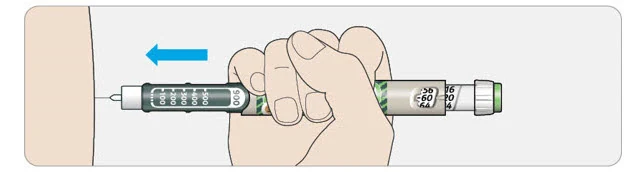
5C Place your thumb on the injection button. Then press all the way in and hold.
- Do not press at an angle. Your thumb could block the dose selector from turning.
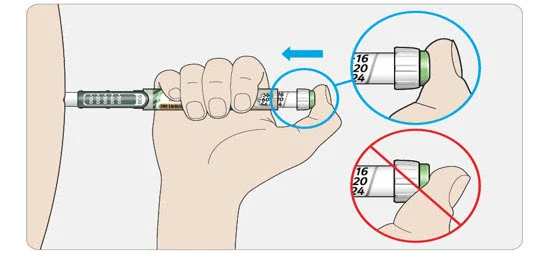
5D Keep the injection button held in and when you see "0" in the dose window, slowly count to 5.
- This will make sure you get your full dose.
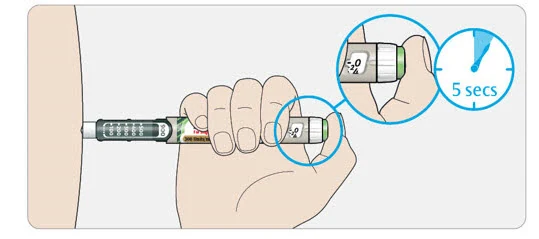
5E After holding and slowly counting to 5, release the injection button. Then remove the needle from your skin.
If you find it hard to press the injection button in:
- Change the needle (see Step 6 and Step 2 ) then do a safety test (see Step 3 ).
- If you still find it hard to press in, get a new pen.
- Do not use a syringe to remove insulin from your pen.
Step 6: Remove the needle
- Take care when handling needles to prevent needle injury and cross-infection.
- Do not put the inner needle cap back on.
6A Grip the widest part of the outer needle cap. Keep the needle straight and guide it into the outer needle cap.
Then push firmly on.
- The needle can puncture the cap if it is recapped at an angle.
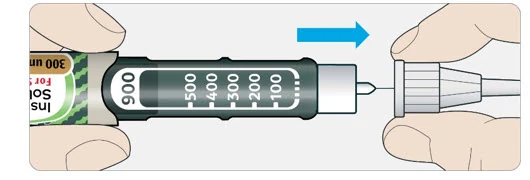
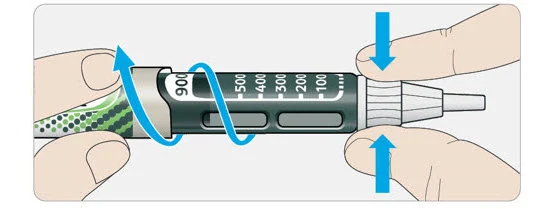
6B Grip and squeeze the widest part of the outer needle cap. Turn your pen several times with your other hand to remove the needle.
- Try again if the needle does not come off the first time.
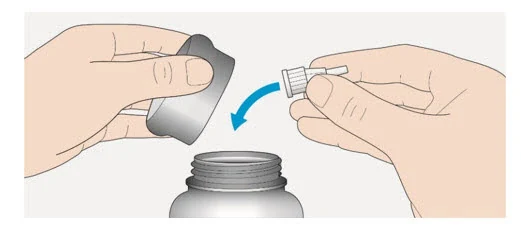
6C Throw away the used needle in a puncture-resistant container (see "Throwing your pen away" at the end of this Instructions for Use).
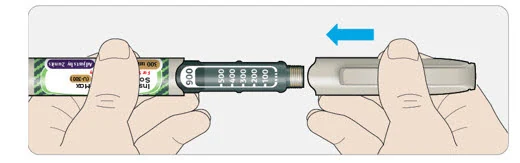
6D Put the pen cap back on.
- Do not put the pen back in the refrigerator.
Use by
- Only use your pen for up to 56 days after its first use.
How to store your pen
Before first use
- Keep new pens in the refrigerator between 36°F and 46°F (2°C and 8°C).
- Do not freeze. Throw away your pen if it has been frozen (see "Throwing your pen away").
After first use
- Keep your pen at room temperature up to 86°F (30°C).
- Protect your pen from direct heat and light.
- Do not put your pen back in the refrigerator.
- Do not store your pen with the needle attached.
- Store your pen with the pen cap on.
- Keep Insulin Glargine, U-300 Max SoloStar pens and needles out of the reach of children.
How to care for your pen
Handle your pen with care
- Do not drop your pen or knock it against hard surfaces.
- If you think that your pen may be damaged, do not try to fix it. Use a new one.
Protect your pen from dust and dirt
- You can clean the outside of your pen by wiping it with a damp cloth (water only). Do not soak, wash or lubricate your pen. This may damage it.
Throwing your pen away
- The used Insulin Glargine, U-300 Max SoloStar pen may be thrown away in your household trash after you have removed the needle.
- Put the used needle in a FDA-cleared sharps disposal container right away after use. Do not throw away (dispose of) needles in your household trash.
If you do not have a FDA-cleared sharps disposal container, you may use a household container that is:
- made of a heavy-duty plastic,
- can be closed with a tight-fitting, puncture-resistant lid, without sharps being able to come out,
- upright and stable during use,
- leak-resistant, and
- properly labeled to warn of hazardous waste inside the container.
When your sharps disposal container is almost full, you will need to follow your community guidelines for the right way to dispose of your sharps disposal container. There may be state or local laws about how you should throw away used needles and syringes. For more information about safe sharps disposal, and for specific information about sharps disposal in the state that you live in, go to the FDA's website at:
http://www.fda.gov/safesharpsdisposal.
- Do not dispose of your used sharps disposal container in your household trash unless your community guidelines permit this. Do not recycle your used sharps disposal container.
Manufactured by:
sanofi-aventis U.S. LLC
Morristown, NJ 07960U.S. License No. 1752
Manufactured for:
Winthrop U.S.,
A business of sanofi-aventis U.S. LLC
Morristown, NJ 07960A SANOFI COMPANY
©2025 Sanofi. All rights reserved.
All trademarks mentioned in this document are the property of the Sanofi group.
(with the exception of BD (such as BD Ultra-Fine®), Ypsomed (such as Clickfine®) or Owen Mumford (such as Unifine® Pentips®))
This Instructions for Use has been approved by the U.S. Food and Drug Administration.
Revised: May 2025