


Patient information: uses, side effects, how to take - Arikayce
What is the most important information I should know about ARIKAYCE?
ARIKAYCE can cause serious side effects, including:
- allergic inflammation of the lungs: These respiratory problems may be symptoms of allergic inflammation of the lungs and often come with:
- fever
- coughing
- fast breathing
- wheezing
- shortness of breath
- coughing up of blood (hemoptysis): Coughing up blood is a serious and common side effect of ARIKAYCE.
- severe breathing problems: Severe breathing problems can be symptoms of bronchospasm. Bronchospasm is a serious and common side effect of ARIKAYCE. Bronchospasm symptoms include:
- shortness of breath
- wheezing
- difficult or labored breathing
- coughing or chest tightness
- worsening of chronic obstructive pulmonary disease (COPD): This is a serious and common side effect of ARIKAYCE.
- serious allergic reactions: Serious allergic reactions that may lead to death have happened to people who take ARIKAYCE. Stop taking ARIKAYCE right away and get emergency medical help if you have any of the following symptoms of a serious allergic reaction:
- hives
- itching
- redness or blushing of the skin (flushing)
- swollen lips, tongue or throat
- trouble breathing or wheezing
- shortness of breath
- noisy high-pitched breathing (stridor)
- cough
- nausea
- vomiting
- diarrhea
- feel cramps in your stomach area
- fast heart rate
- feeling light headed
- feeling faint
- loss of control of the bowels or bladder (incontinence)
- dizziness
While using ARIKAYCE these side effects may become serious enough that treatment in a hospital is needed.
Call your healthcare provider or get medical help right away if you have any of these serious side effects while taking ARIKAYCE. Your healthcare provider may ask you to stop using ARIKAYCE for a short period of time or completely stop using ARIKAYCE.
What is ARIKAYCE?
ARIKAYCE is a prescription medicine used to treat adults with refractory (difficult to treat) Mycobacterium avium complex (MAC) lung disease as part of a combination antibacterial drug treatment plan (regimen).
It is not known if ARIKAYCE is safe and effective in children younger than 18 years of age.
This product was approved by FDA using the Limited Population pathway. This means FDA has approved this drug for a limited and specific patient population, and studies on the drug may have only answered focused questions about its safety and effectiveness.
Do not use ARIKAYCE if you:
- are allergic to any aminoglycoside, or any of the ingredients in ARIKAYCE. See " What are the ingredients in ARIKAYCE? " at the end of this leaflet for a complete list of ingredients in ARIKAYCE.
Before using ARIKAYCE, tell your healthcare provider about all of your medical conditions, including if you:
- have asthma, chronic obstructive pulmonary disease (COPD), shortness of breath or wheezing (bronchospasm).
- have been told you have poor lung function.
- have or have had hearing problems (including noises in your ears such as ringing or hissing), hearing loss, or your mother has had hearing problems after taking an aminoglycoside.
- have been told you have certain gene variants (a change in the gene) related to hearing abnormalities inherited from your mother.
- have dizziness or sense of the room spinning.
- have kidney problems.
- have neuromuscular disease such as myasthenia gravis.
are pregnant or plan to become pregnant. It is not known if ARIKAYCE can harm your unborn baby. ARIKAYCE is in a class of medicines that may be connected with complete deafness in babies at birth. The deafness affects both ears and cannot be changed.
- are breastfeeding or plan to breastfeed. It is not known if the medicine in ARIKAYCE passes into your breast milk and if it can harm your baby. Talk to your healthcare provider about the best way to feed your baby during treatment with ARIKAYCE.
Tell your healthcare provider about all the medicines you take, including prescription medicines and over-the-counter medicines, vitamins, and herbal supplements.
How should I use ARIKAYCE?
- Read the step-by-step instructions for using ARIKAYCE at the end of the Medication Guide and the full Instructions for Use provided in your kit. The manufacturer's Instructions for Use provides complete information about how to put together (assemble), prepare, use, clean, and disinfect your Lamira® Nebulizer System.
- Do not use ARIKAYCE unless you understand the directions provided. If you have questions talk to your health care provider or call Insmed inLighten™ Patient Support at 1-833-LIGHT-00 (1-833-544-4800).
- Use ARIKAYCE exactly as your healthcare provider tells you to use it. Do not use ARIKAYCE more often than prescribed for you.
- Only use ARIKAYCE with the Lamira Nebulizer System.
- Inhale each daily dose of ARIKAYCE 1 time each day through the Lamira Nebulizer Handset. Do not use more than 1 vial of ARIKAYCE in a day.
- Do not use ARIKAYCE after the expiration date on the vial. If you forget to take your daily dose of ARIKAYCE, take your next dose at your usual time the next day.
- Do not double the dose to make up for the missed dose.
- Do not stop using ARIKAYCE or other medicines to treat your MAC lung disease unless told to do so by your healthcare provider.
- If you use too much ARIKAYCE, call your healthcare provider or go to the nearest emergency room right away.
What are the possible side effects of ARIKAYCE?
ARIKAYCE may cause serious side effects, including:
- See "What is the most important information I should know about ARIKAYCE?"
- hearing loss or ringing in the ears (ototoxicity). Ototoxicity is a serious and common side effect of ARIKAYCE. Tell your healthcare provider right away if you have hearing loss or you hear noises in your ears such as ringing or hissing. Tell your healthcare provider if you start having problems with balance or dizziness (vertigo).
- worsening kidney problems (nephrotoxicity). ARIKAYCE is in a class of medicines which may cause worsening kidney problems. Your healthcare provider may do a blood test to check how well your kidneys are working during your treatment with ARIKAYCE.
- worsening muscle weakness (neuromuscular blockade). ARIKAYCE is in a class of medicines which can cause muscle weakness to get worse in people who already have problems with muscle weakness (myasthenia gravis).
The most common side effects of ARIKAYCE include:
- changes in your voice and hoarseness (dysphonia)
- tiredness (fatigue)
- headache
- rash
- cough during or after a dose of ARIKAYCE, especially in the first month after starting treatment.
- sore throat
- diarrhea
- fever
- decreased weight
- chest discomfort
- muscle pain
- nausea
- vomiting
- increased sputum
These are not all of the possible side effects of ARIKAYCE.
Call your doctor or pharmacist for medical advice about side effects. You may report side effects to FDA at 1-800-FDA-1088.
How should I store ARIKAYCE?
- Store ARIKAYCE vials refrigerated between 36°F to 46°F (2°C to 8°C) until the expiration date on the vial. Do not freeze.
- After ARIKAYCE has been stored in the refrigerator, any unused medicine must be thrown away (disposed of) after the expiration date on the vial.
- Store ARIKAYCE vials at room temperature between 68°F to 77°F (20°C to 25°C) for up to 4 weeks.
- After ARIKAYCE has been stored at room temperature any unused medicine must be thrown away (disposed of) at the end of 4 weeks.
- Use an opened ARIKAYCE vial right away.
- Throw away the ARIKAYCE vial right away after use.
Keep ARIKAYCE and all medicines out of the reach of children.
General information about safe and effective use of ARIKAYCE
Medicines are sometimes prescribed for purposes other than those listed in a Medication Guide. Do not use ARIKAYCE for a condition for which it was not prescribed. Do not give ARIKAYCE to other people even if they have the same symptoms that you have. It may harm them. You can ask your pharmacist or healthcare provider for information about ARIKAYCE that is written for health professionals.
What are the ingredients in ARIKAYCE?
Active ingredient: amikacin sulfate
Inactive ingredients: Dipalmitoylphosphatidylcholine (DPPC), cholesterol, sodium chloride, sodium hydroxide (for pH adjustment), and water for injection
Manufactured for: Insmed Incorporated, 700 US Highway 202/206, Bridgewater, NJ 08807-1704
© 2018 Insmed Incorporated. All rights reserved. Insmed®, ARIKAYCE®, and inLighten™ are trademarks of Insmed Incorporated. Lamira® is a trademark of PARI Pharma GmbH.
For more information, call Insmed inLighten Patient Support at: 1- 833-LIGHT-00 (1-833-544-4800)
Instructions for Use
ARIKAYCE® LIMITED POPULATION
(amikacin liposome inhalation suspension)
For oral inhalation use
Lamira® Nebulizer System
Before using your Lamira Nebulizer System, be sure you read and understand the detailed information in the full Instructions for Use that comes with the Lamira Nebulizer System. This will provide more complete information about how to put together (assemble), prepare, use, clean, and disinfect your Lamira Nebulizer System. If you do not understand any part of the instructions, contact Insmed inLighten™ Patient Support at 1-833-LIGHT-00 (1-833-544-4800) before using the Lamira Nebulizer System.
| Gather your ARIKAYCE medicine. The ARIKAYCE 28-day kit contains: | |
| |
| Check to make sure you have all the necessary parts for your Lamira Nebulizer System: | |
| 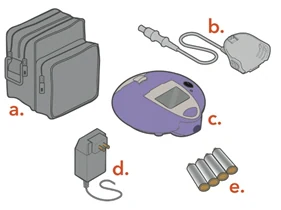 |
Spare Lamira Nebulizer Handset:
| 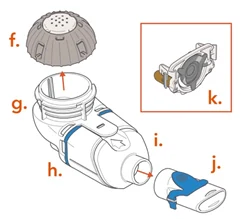 |
| You will also need the following supplies that do not come in your ARIKAYCE 28-day kit that will help you care for your Lamira Nebulizer System: | |
| |
| Choose your power supply and get it ready. | |
| 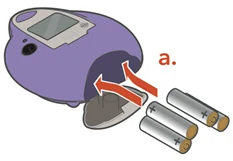 |
| or | |
Do not insert the A/C Power into the front of the Controller. | 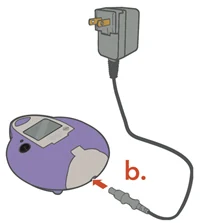 |
Cleaning and Disinfecting
Before first use, rinse, clean, and disinfect your Handset and Aerosol Head. Moving forward, rinse, clean, and disinfect the Handset including the Aerosol Head after every use.
When you receive your Handset and Aerosol Head, they will not be sterile. Cleaning and disinfecting your Handset and Aerosol Head is important to reduce the risk of infection, illness, and contamination.
| |
|  |
|  |
|  |
|  |
| |
|  |
|  |
Assembling Your Handset
| Step 1: Wash your hands with soap and water , and dry them well. | 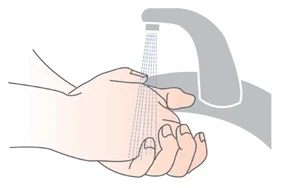 |
Step 2: Insert the Blue Valve. Open the Handset by gently pulling up on the tab of the Medication Reservoir. Insert the Blue Valve so that it rests on top of the Aerosol Chamber with the 2 valve flaps facing down (valve flaps not bent). | 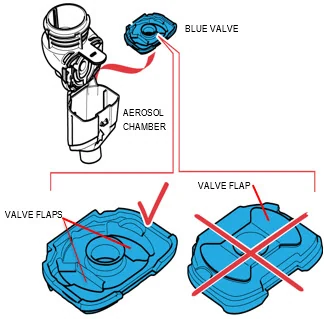 |
| Step 3: Insert the Aerosol Head. | |
Grasp the Aerosol Head by the 2 flexible plastic tabs on each side. Be sure the text "Lamira®" is facing toward you and is at the top of the Aerosol Head. Squeeze the 2 flexible plastic tabs together while inserting the Aerosol Head into the Medication Reservoir. Close the Handset when you are done (no gaps along blue valve edge). Do not touch the silver part of the Aerosol Head at any time. After the Aerosol Head has been used 7 times, throw away (dispose of) and replace with a new one during the cleaning process. Lamira Handset is to be used for 28 days. | 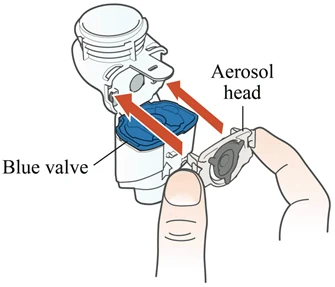 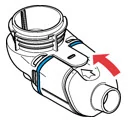 |
| Step 4: Attach the Mouthpiece to your Handset with the Blue Flap facing up. | 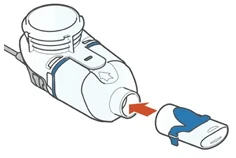 |
| Step 5: Finally, attach the Handset to the Controller. | |
| 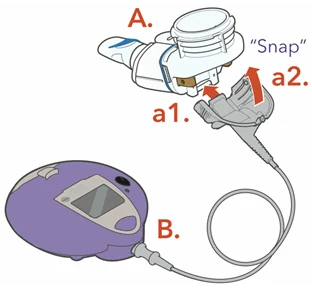 |
Taking ARIKAYCE
Your ARIKAYCE should be at room temperature before use to make sure that your Lamira Nebulizer System operates properly. Do not use other medicines in your Handset.
Bring ARIKAYCE to room temperature by removing it from the refrigerator at least 45 minutes before use. Do not use if your ARIKAYCE has been frozen.
Step 1: Get your ARIKAYCE ready.
|  |
| How to open the ARIKAYCE vial | |
|  |
|  |
|  |
|  |
|  |
| Step 2: Sit in a relaxed, upright position. | |
|  |
Step 3: Insert the Mouthpiece (but do not cover the blue flap) and take slow, deep breaths.
Be sure to hold the Handset level throughout the treatment. | 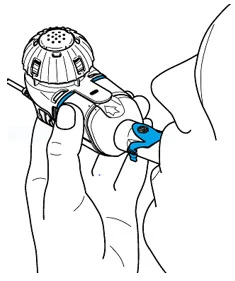 |
| Step 4: Check that your treatment has ended. | |
| 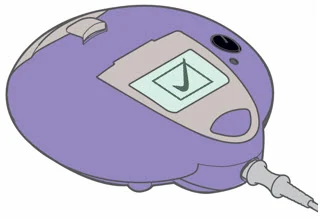 |
| For any issues you may have with your Lamira Nebulizer System, see Section J – Frequently Asked Questions and Section K – Troubleshooting of the full Instructions for Use that comes with your medicine. | |
Cleaning your Lamira Handset and Aerosol Head After Use
- Rinse, clean, and disinfect handset right away after each use to reduce infection, illness, and contamination.
- Disinfect the Handset and Aerosol Head after every use.
- See "Cleaning and Disinfecting" at the beginning of the Instructions for Use on how to properly clean and disinfect your handset and aerosol head.
© 2018 Insmed Incorporated. All rights reserved. Insmed®, ARIKAYCE®, and inLighten™ are trademarks of Insmed Incorporated. Lamira® is a trademark of PARI Pharma GmbH.
This Instructions for Use has been approved by the U.S. Food and Drug Administration.
Issued: 01/2025
A Table of Contents and Introduction
| Table of Contents | ||
|---|---|---|
| A. Introduction | 1 | |
| B. Safety Precautions | 2 | |
| C. Getting Started | 3 | |
| D. Using Batteries or the A/C Power Supply | 4 | |
| E. Maintaining Your Lamira | 5 | |
| F. Cleaning Your Lamira | 6 | |
| G. Disinfecting Your Lamira | 9 | |
| H. Assembling Your Lamira Handset | 10 | |
| I. Taking ARIKAYCE | 13 | |
| J. Frequently Asked Questions | 16 | |
| K. Troubleshooting | 17 | |
| L. Specifications | 19 | |
| Introduction |
The Lamira® Nebulizer System (Lamira) is a battery operated electronic nebulizer, which vibrates and forces liquid ARIKAYCE® (amikacin liposome inhalation suspension) through thousands of small holes to form an aerosol mist for inhalation.
These Instructions for Use contain information and safety precautions for the Lamira nebulizer that is made just for the medicine ARIKAYCE. Do not use any other medicine in the Lamira nebulizer.
Before using your Lamira nebulizer, read and understand all the Instructions for Use and save them for future reference. If you do not understand any part of these directions, contact the Insmed® inLighten™ Patient Support Program at 1-833-LIGHT-00 (1-833-544-4800) before using the Lamira nebulizer.
To reduce the risk of infection, illness, or injury from contamination or improper use, it is important to complete the following 2 steps:
- 1) Before first use, rinse and clean the Handset including the Aerosol Head. Moving forward, rinse and clean the Handset including the Aerosol Head right after each use (see Section F). Do not wash the Controller, Connection Cord, or A/C Power Supply. Use clear liquid soap made for washing dishes to clean the Handset including the Aerosol Head. Do not use liquid dish soaps that are white or antibacterial liquid dish soaps because these may contain additives harmful to the Aerosol Head.
- 2) Before first use, disinfect the Handset including the Aerosol Head. Moving forward, disinfect the Handset including the Aerosol Head after every use (see Section G).
Take special note of all safety precautions marked Danger and Warning.
Indications for use
Limited by Federal Law for use only with ARIKAYCE.
B Safety Precautions
Read all dangers and warnings before using.
 To reduce the risk of fatal injury from electrocution:
|
To reduce the risk of serious injury:
- The Lamira Nebulizer Handset (Handset) is for single patient use. Do not share your Handset with other people.
- The Handset is made just for ARIKAYCE. Never use other medicine in the Handset. Using other medicine in the Lamira nebulizer can result in severe injury or death.
- Read, understand and follow all warnings and instructions in these Instructions for Use before using the Lamira nebulizer.
To reduce the risk of fire, burns and damage or malfunction of the Controller:
- Do not overload wall outlets or use extension cords.
- Keep all electrical cords away from heated surfaces.
- Do not spray liquids onto the housing of the Controller (Controller). (See Section C: Getting Started) Liquid may cause damage to the electrical parts and could lead to a malfunction. If liquids enter the Controller, contact the inLighten Patient Support Program at 1-833-LIGHT-00 (1-833-544-4800).
- Do not insert any object into any opening on the Lamira.
- Do not operate where oxygen is being given in a closed environment such as an oxygen tent.
- Always unplug the Lamira right after using and before cleaning.
- Before use, check your Lamira for proper assembly. All parts must be connected and firmly in place. Use of an improperly assembled Lamira could decrease or stop the effectiveness of your treatment.
- Use only A/C power supply and accessories that are made for the Lamira. Use of unapproved A/C power supply or accessories can lead to improper administration, injury, leading to damage to the Controller.
- Never substitute the Handset for any other eFlow® Technology Handset such as Altera®, eRapid® or any other eFlow®. Never use the Lamira Aerosol Head (Aerosol Head) in any other eFlow® Technology Handset. This Aerosol Head has unique performance characteristics for ARIKAYCE.
- Never operate the Controller if it is improperly or incompletely assembled or damaged. See Section K: Troubleshooting for more information about alerts that appear when the Lamira is improperly assembled or might be damaged.
Never operate the Lamira if:
- It has damaged cords or plugs,
- it is not working properly,
- it has been dropped or damaged,
- the Controller has been exposed to liquids
- To reduce the risk of infection, illness, or injury from contamination, clean and dry all parts of the Handset after each use. Follow the instructions in Section E to maintain and clean the Lamira.
- Cleaning the Handset properly will help prevent the Aerosol Head from clogging. Replace the Aerosol Head with a new one after 7 uses. Lamira Handset is to be used for 28 days. If the Aerosol Head becomes clogged, the aerosol mist will be reduced, which may increase your inhalation time of therapy. If clogging occurs, use the instructions in Section F to clean the Aerosol Head.
- Cleaning the Handset and Aerosol Head only removes the medicine and saliva. To reduce the risk of serious or fatal illness caused by contamination of the Handset, you must also disinfect the Handset and Aerosol Head after every cleaning. See Section G for disinfection instructions.
- The Lamira contains small parts that may become a choking hazard to small children. The Lamira Connection Cord (Connection Cord) also may become a strangulation hazard.
- Do not allow pets, for example dogs or rodents, near the cables.
- Keep the Lamira out of reach of children.
- Keep the Handset level when in use. Excessive tilting can cause the Controller to shut off leaving unused ARIKAYCE in the Medication Reservoir and resulting in incomplete dosing.
- Closely supervise use when the Lamira is used near children or the physically or mentally impaired.
- Do not use your Lamira while driving or in any situation which takes away your full attention.
- If the Lamira has been damaged or is not operating properly, contact the inLighten Patient Support Program at 1-833-LIGHT-00 (1-833-544-4800).
- Do not take the Controller apart at any time. There are no user serviceable parts inside the Controller. Contact the inLighten Patient Support Program at 1-833-LIGHT-00 (1-833-544-4800) for all Controller service needs.
- Do not modify this equipment without authorization from the manufacturer.
- Do not use the device in areas exposed to elevated electromagnetic or electrical radiation such as a MRI scanner or high frequency surgical equipment.
- Do not place near other medical devices during operation unless both devices are monitored constantly to make sure both are operating properly.
- Do not use within 12 inches (30 cm) of portable wireless communication devices such as cell phones or antenna cables or external antennas.
- Do not use near airplane or train control systems. Do not use aboard aircraft.
- Do not use the nebulizer near anti-theft systems and Radio Frequency Identification (RFID) readers, which are used in a wide variety of settings, including stores, libraries, and hospitals. Do not power on the nebulizer when passing through security screening or theft protection (RFID) systems at entrances or exits of stores, libraries or hospitals. Note that some entrance and exit security systems are not visible.
Technical electromagnetic compatibility data is available in table form upon request from PARI Pharma GmbH or on the internet at https://www.pari.com/fileadmin/Electromagnetic-compatibility-4.pdf
C Getting Started
| Step C1: | Gather your dosing supplies
|
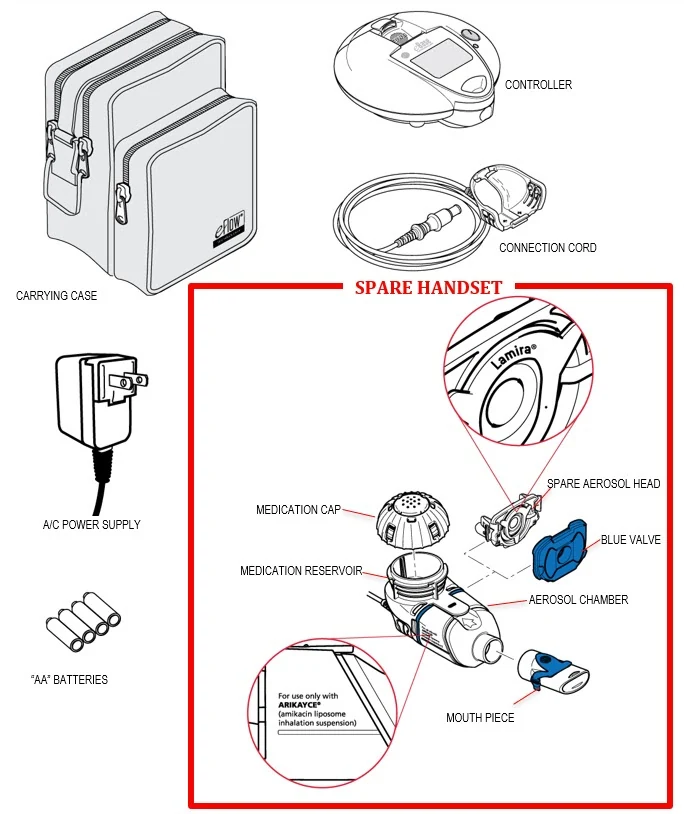
| Step C2: | Check your Lamira Nebulizer System package to make sure you have the items shown below. Note that the package contains a Handset that should be set aside as a spare. If anything looks damaged, contact the inLighten Patient Support Program at 1-833-LIGHT-00 (1-833-544-4800). |
 |
D Using Batteries of the A/C Power Supply
| The Lamira is made to be used with "AA" batteries or with the A/C Power Supply. | ||
| Using Batteries: Four (4) high quality "AA" batteries should provide 2 hours of total use. | 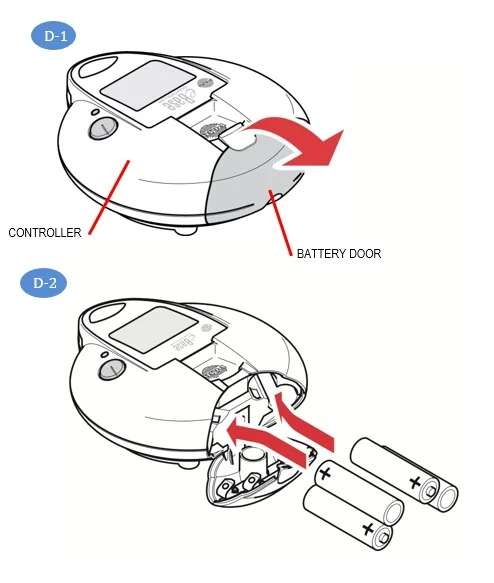 | |
| Step D1: | Open the Battery Door on the Controller by placing your thumb on the tab of the Battery Door and firmly pulling the tab to open the Door (D-1). | |
| Step D2: | Load the Batteries. Each Battery Chamber has a small figure that shows the proper position of each battery (D-2). Using the battery "tips" as guides and starting left-to-right for each row, insert the batteries: Tip Out, Tip In, Tip Out, Tip In. Close the Battery Door. To close the Battery Door, push it closed until you hear it "click" into place. | |
| NOTE: | Rechargeable and Disposable Batteries have differences in storage life and output. If you plan to store the Controller for more than 30 days, it is recommended to remove the batteries to reduce the risk of battery leakage. | |
| If you choose not to use the A/C Power Supply, you should have an extra battery set with you at all times. | ||
| Using the A/C Power Supply: The A/C Power Supply will automatically adjust to the incoming voltage and will power the Controller with or without installed batteries. It can be used worldwide, but requires "Plug Converters" for use outside the USA. | 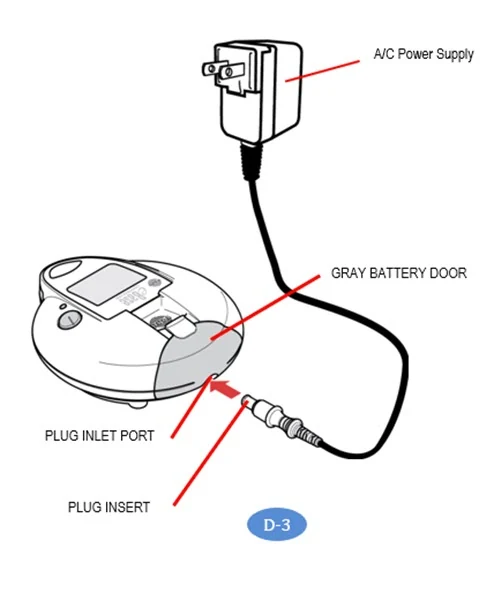 | |
| Step D3: | Plug the A/C Power Supply into the Controller. To connect the A/C Power Supply to the Controller, place the Controller on a clean, flat, stable surface. The plug inlet port is located on the underside of the gray Battery Door. Push the round end of the A/C Power Supply plug into the plug inlet port (D-3). Do not try to insert the A/C Power Supply into the front of the Controller. | |
| Step D4: | Plug the A/C Power Supply into the wall outlet. Note that the A/C Power Supply will not charge the batteries in the Controller. | |
E Maintaining Your Lamira
To reduce the risk of infection, illness, or injury from contamination or improper use, it is important to complete the following 2 steps:
|

|
Handset Maintenance Summary (see the next page for complete instructions)
| Instruction | When | Parts cleaned | Method | How Long | Comments |
|---|---|---|---|---|---|
| Wipe | After each use |
| Wipe with clean disposable paper towel. | 1 second per part | Wipe to remove residual medicine and then dispose of paper towel in trash with solid waste. |
| Rinse | Prior to first use, then after each use |
| Warm running tap water. | 10 seconds | Rinse each side of the Aerosol Head for 10 seconds. |
| Clean | Prior to first use, then after each use |
| Soak each piece in warm soapy water. While soaking swish or shake each piece. | 5 minutes | Use 3 to 5 drops of clear liquid dish soap in a bowl with enough warm water to cover all pieces. Soak longer if Handset has dried or if visibly dirty. |
| Rinse | Prior to first use, then after each use |
| Warm running tap water. | Until soap is removed. | Check each part and soak for another 5 minutes if any part looks dirty. |
| Disinfect | Prior to first use, then after each use |
| Boil in distilled water. | 5 minutes | Air-dry in a dust-free environment. |
F Cleaning Your Lamira
 Your Handset including the Aerosol Head is not sterile. Contamination and moisture may cause the growth of bacteria, and the Aerosol Head can be affected by ARIKAYCE left over in it. Before first use, it is important to rinse, clean, and disinfect your Handset including the Aerosol Head. Moving forward, rinse, clean, and disinfect the Handset including the Aerosol Head right after every use. If your Handset or Aerosol Head looks dirty, soak the parts in soapy water for longer than 5 minutes. Do not place the Handset or the Aerosol Head in a dishwasher.
| Cleaning your Handset | |||
|---|---|---|---|
| Step F1: | Disconnect your Handset from the Connection Cord (F-1). | 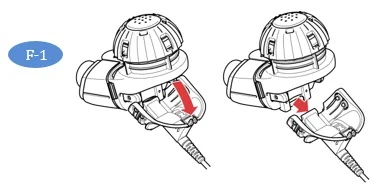 | |
| Step F2: | Remove the Medication Cap by turning counterclockwise and pulling straight up (F-2). | 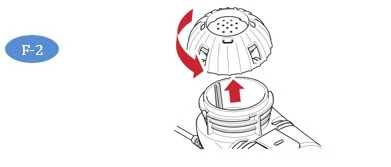 | |
| Step F3: | Remove the Mouthpiece from the Aerosol Chamber by pulling straight off (F-3). The Blue Flap must still be attached to the mouthpiece as shown in the picture. | 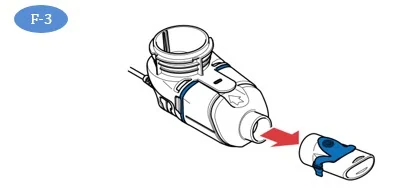 | |
| Step F4: | Gently pull up on the tab to open the Handset and remove the Blue Valve (F-4). | 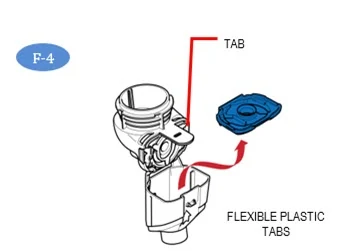 | |
| Step F5: | Being careful to touch only the plastic outer ring of the Aerosol Head, press the 2 flexible plastic tabs on the side of the Aerosol Head towards each other and remove (F-5). After the Aerosol Head has been used 7 times, throw away (dispose of) and replace with a new one. | 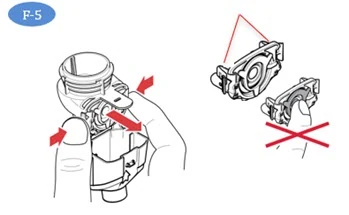 | |
| Do not touch the center silver part of the Aerosol Head. | |||
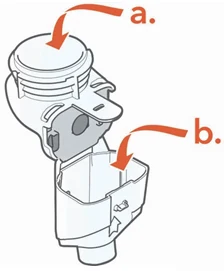
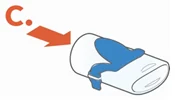
| Step F6: | Gently wipe away any drops of medicine from the Medication Reservoir (F-6a), Aerosol Chamber (F-6b) and Mouthpiece (F-6c) before rinsing to reduce antibiotics added to water systems. Use only plain, dry paper towels or wipes. Do not use towels or wipes that have any chemicals added to them such as alcohol, lotion, or baby wipes. Be careful not to harm the parts. Do not wipe the Aerosol Head. Throw away paper towels by disposing in trash with solid waste. | 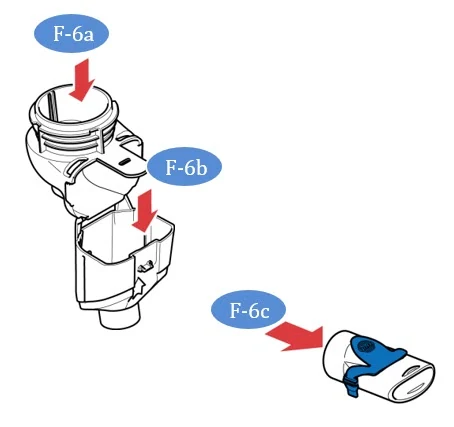 | |
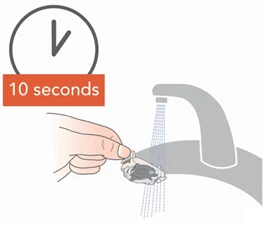
| Step F7: | Rinse each of the parts under warm running tap water for 10 seconds. Pay special attention to rinsing the Aerosol Head and rinse each side of the Aerosol Head for 10 seconds (F-7). Thorough rinsing of both sides of the Aerosol Head helps to prevent clogging and makes sure the Aerosol Head works properly. Never use a brush or any other object to clean the Aerosol Head. | 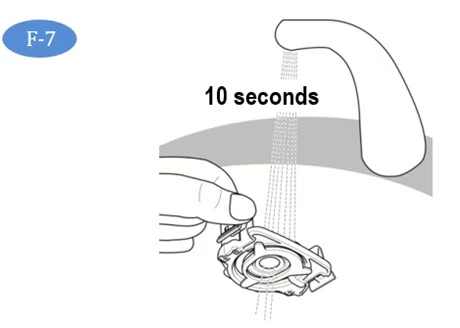 | |
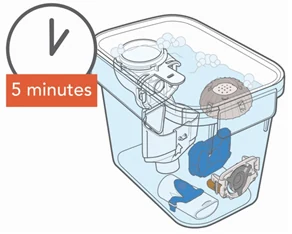
| Step F8: | Clean all Handset parts by adding a few drops of clear liquid dish soap and warm tap water to a clean tub or bowl. Cover the Handset parts in the warm soapy water and soak for 5 minutes, shaking them periodically (F-8). | ||
| Step F9: | Rinse all parts thoroughly under warm running tap water to remove soap (F-9). Check each part and soak for another 5 minutes if any of the parts look dirty. After all parts are cleaned and free from soap, disinfect your Handset. | 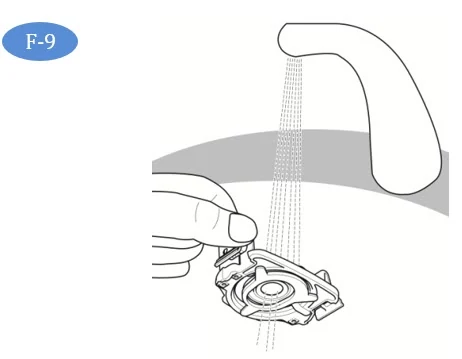 | |
| Step F10: | Disinfect the Handset including the Aerosol Head after cleaning. In addition to cleaning ARIKAYCE from your Handset, you must also disinfect your Handset to remove bacteria and avoid infection. See Section G for instructions on how to disinfect your Lamira Handset. | ||
| Cleaning your Controller and Connection Cord | |||
| Step F11: | To reduce the risk of electric shock, disconnect all connections before cleaning. Switch off the Controller. Remove the Connection Cord and A/C Power Supply cord from the Controller. | ||
| Step F12: | Clean the Controller housing and Connection Cord as needed with a soft, clean, damp cloth. Do not place the Controller unit under water or allow liquid to get inside the Controller. Make sure moisture from the cloth does not enter the Controller. | ||
 Never let the Controller come in contact with water or cleaning agents. If liquid does get into the Controller, contact the inLighten Patient Support Program. | |||
G Disinfecting Your Lamira
 To prevent serious or fatal illness or injury caused by contamination, disinfect your Handset including the Aerosol Head after every use. | ||
| Step G1: | Clean your Handset right after every use with soapy water as described in Section F. | |
| Step G2: | Disinfect your Handset after every use by boiling in distilled water. To disinfect with boiling water,
| |
| Step G3: | Air dry on a lint-free towel (G-3). After the parts are completely dry, wrap them in a lint-free towel for storage. Reassemble just before taking your next treatment. This is to make sure the Blue Valve will not become damaged. | 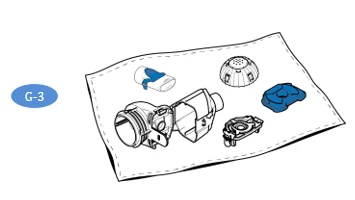 |
H Assembling Your Lamira Handset
| Your Handset including the Aerosol Head is not sterile. Before first use, rinse, clean, and disinfect your Handset (See Section F). Moving forward, rinse, clean, and disinfect the Handset right after each use (See Section G). Inspect all parts to make sure they are cleaned and are not visibly damaged. Do not use dirty or damaged parts. | |||
| Clean and disinfect your Handset before the first use. | |||
| Step H1: | Clean and Disinfect your Handset before the first time you use it. See Sections F and G. | ||
| Step H2: | Wash your hands with soap and water and dry them well (H-2). | 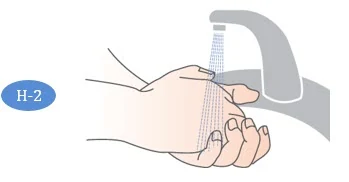 | |
| Step H3: | Open the Handset. The Medication Reservoir and the Aerosol Chamber are attached using a "hinge". First, gently pull up on the tab of the Medication Reservoir (H-3). This will release the Aerosol Chamber so that you may open it. | 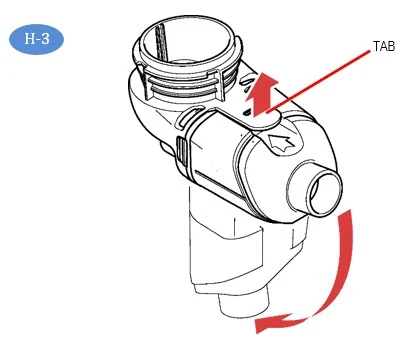 | |
| Step H4: | Insert the Blue Valve on top of the Aerosol Chamber (H-4). Make sure the 2 valve flaps are positioned down (valve flaps not bent) as shown in H-4a. Do not push the Blue Valve inside of the Aerosol Chamber. The Blue Valve should be placed on top of the Aerosol Chamber. | 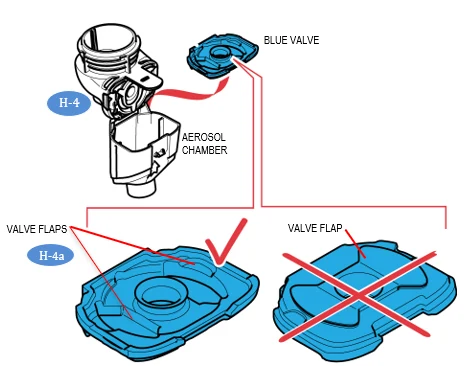 | |
| Step H5: | Insert the Aerosol Head Note: It is important that you do not touch the silver part of the Aerosol Head at any time during assembly. (H-5a) | 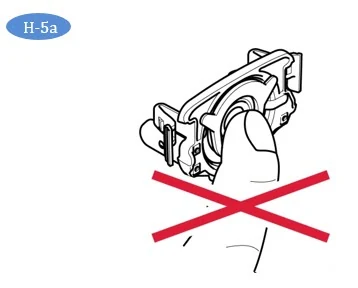 | |
| Check to make sure the Aerosol Head is labeled "Lamira®". Do not use other eFlow Technology Aerosol Heads in the Lamira. (H-5b). | 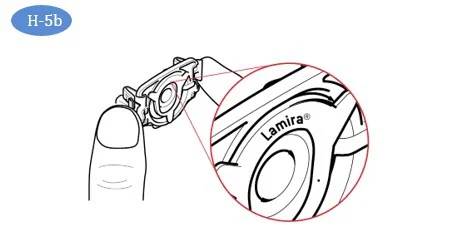 | ||
| Carefully grasp the Aerosol Head by the 2 flexible plastic tabs on each side of the Aerosol Head. Turn the Aerosol Head so that "Lamira®" is facing toward you and is at the top of the Aerosol Head (H-5b). | |||
| Squeeze the two flexible plastic tabs together while inserting the metal arms and flexible plastic tabs into the Medication Reservoir (H-5c). You should feel the flexible plastic tabs "grab" as you insert it. | 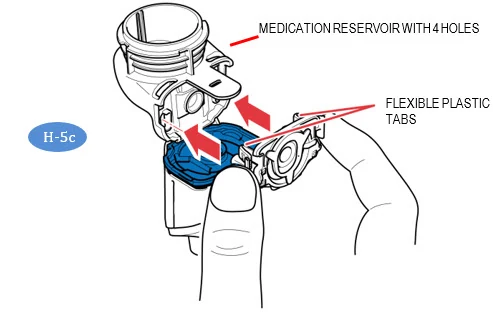 | ||
| Step H6: | Close your Handset by pushing the Aerosol Chamber together with the Medication Reservoir until you hear a "snap" (no gaps along the blue valve edge) (H-6). If you do not hear a snap, open the Handset and check that the Blue Valve is seated properly (See Step H-4 ). | 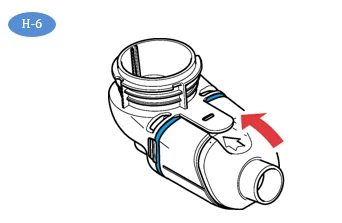 | |
| Step H7: | Attach Mouthpiece to your Handset. Make sure the Blue Flap is facing up (H-7) and is pressed in the slot on the Mouthpiece. Push the Mouthpiece straight onto the Handset. Make sure the Mouthpiece stays attached to the Handset during treatment. | 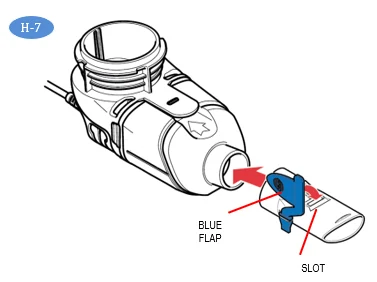 | |
| Step H8: | Attach the Connection Cord by lining up the bottom of the Connector with the bottom of the Handset (H-8a) and pushing the Connection Cord upward against the rear underside of the Handset (H-8b) until you hear the parts snap together. | 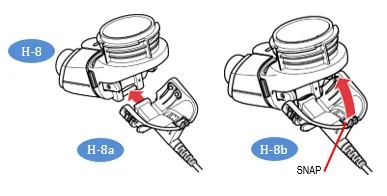 | |
| Step H9: | Connect the Connection Cord to the Controller. Push the round end of the Connection Cord into the plug inlet port located under the digital display (H-9). Place the Controller with the attached Handset on a clean, flat, stable surface. | 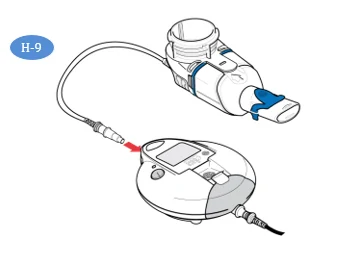 | |
I Taking ARIKAYCE
Important information to know before you start
Getting your ARIKAYCE ready before adding it to the Lamira Nebulizer Handset. | Your ARIKAYCE should be at room temperature before use to make sure that your Lamira operates properly. Bring ARIKAYCE to room temperature by removing it from the refrigerator at least 45 minutes before use. Do not use if your ARIKAYCE has been frozen. Do not use other medicine in your Handset. | |
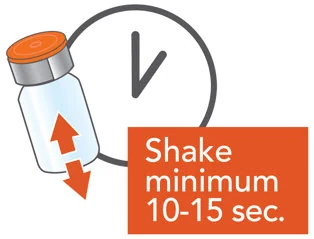
| Step I1: | Shake the ARIKAYCE vial well for a minimum of 10 to 15 seconds, AND UNTIL THE MEDICINE LOOKS THE SAME THROUGHOUT AND WELL MIXED (I-1). | 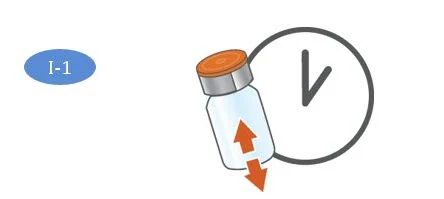 |
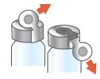
| Step I2: | Lift orange cap from vial and throw away (dispose of) the orange cap (I-2). | |
| Step I3: | Grip metal ring on top of the vial. Pull it down gently (I-3) until 1 side breaks away from the vial but do not pull the tab completely off (I-3a). | 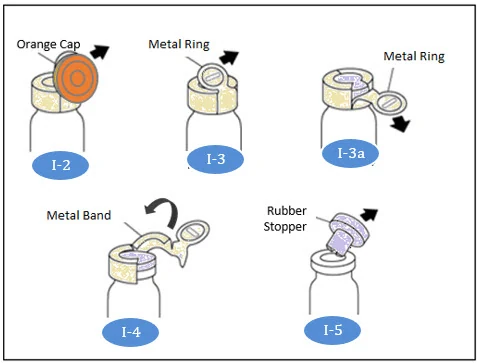 |
| Step I4: | Pull the metal band from around the vial top in a circular motion until it comes off completely from the vial (I-4). Throw away (dispose of) the metal band after it is removed. | |
| Step I5: | Carefully remove the rubber stopper by pulling it upward (I-5). | |
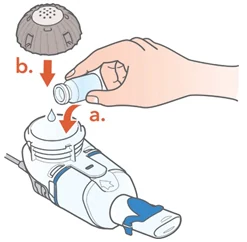
| Step I6: | Make sure your Handset is placed on a clean, flat, stable surface. Pour 1 vial of ARIKAYCE into the Medication Reservoir (I-6). Do not use more than 1 vial for each treatment. | 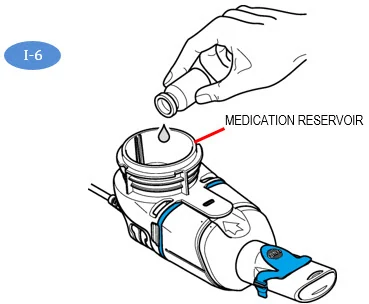 |
| Step I7: | Attach the Medication Cap by lining up the Tabs on the Medication Cap with the Tab Slots on the Medication Reservoir (I-7). Turn the Medication Cap clockwise until it stops. As the Medication Cap is turned, the inner cap of the Medication Cap should rise. | 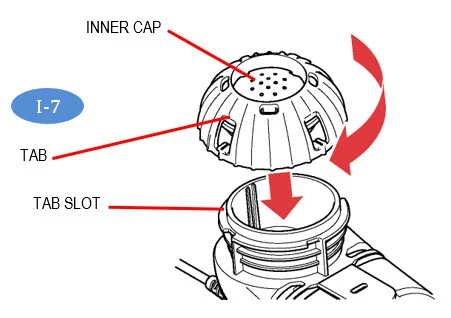 |
| Step I8: | To begin your treatment, sit in a relaxed, upright position. Press and hold the On/Off (2 to 3 seconds) (I-8) until the start screen appears on the LCD display (I-8a). You will also hear 1 "beep" and the status light will turn green. The Lamira is now On. After treatment begins, the treatment screen (I 8b) will replace the start screen (I-8a) and aerosol mist will begin to flow. | 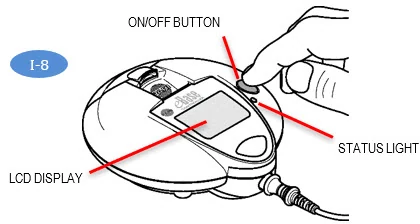 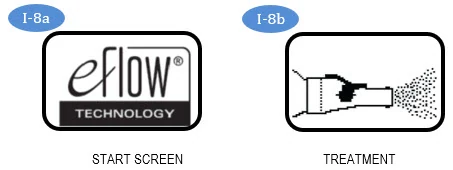 |
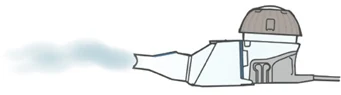
| Step I9: | Insert the Mouthpiece by placing it on top of your bottom lip and tongue. Close your lips around the Mouthpiece but do not cover the blue flap (I-9). Take slow, deep breaths then breathe normally in and out through the Mouthpiece until your treatment is complete. Your treatment should take about 14 minutes, but could take up to 20 minutes. | 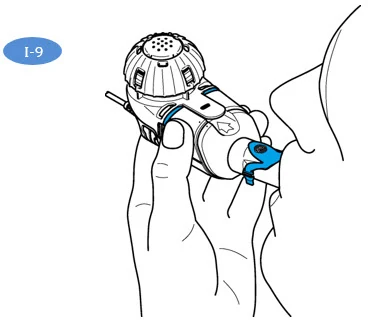 |
| Hold the Handset level throughout your treatment. If the Handset is held at an angle over 45 degrees (I-9a), it will sound 2 beeps (and LED flashes) and shut off after 30 seconds. If this occurs, hold the Handset level and press the On/Off Button to start your treatment again. | 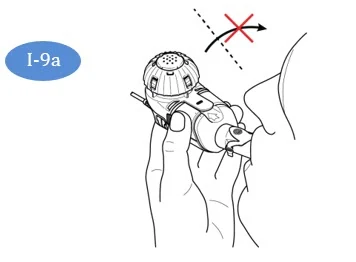 | |
| Note: | The Lamira can be paused at any time during operation by pressing the On/Off button for 1 second. The screen will go from On (I-9b) to Pause (I-9c), a 5-beep alarm tone will sound, and the status light on the Controller will flash. To resume your treatment, press the Controller On/Off button for 1 full second. The Controller will run for up to 20 minutes. If your treatment is not complete after 20 minutes, press the On/Off button to continue treatment. | 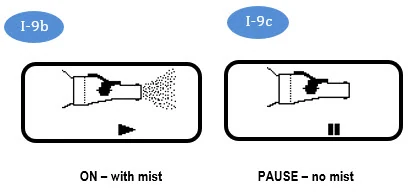 |
Important Information: The amount of time to nebulize your ARIKAYCE may change from dose to dose and may become longer unless the cleaning and maintenance instructions are followed (See Maintaining Your Lamira). | ||
| Step I10: | At the end of your treatment, the following will happen:
| 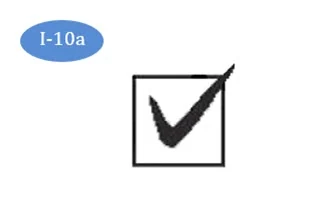 |
Always check the Medication Reservoir by removing the Medication Cap (I-10b) to make sure you have completed your dose. If more than a few drops of ARIKAYCE remains, replace the Medication Cap (I-10c) and press On/Off start button and complete your dose. Change your Aerosol Head after 7 uses. After the Aerosol Head has been used 7 times, replace it with a new Aerosol Head during the cleaning process. Follow the instructions in Steps F6 through F9 and replace the Aerosol Head with a new one. Change your Handset after 28 days. After the Handset has been used for 28 days, replace it with a new Handset during the cleaning process. | 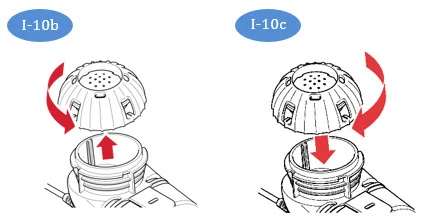 Important: Clean and disinfect your Handset after each use. See sections F and G for instructions. Change your Aerosol Head after 7 uses. Lamira Handset is to be used for 28 days. | |
J Frequently Asked Questions
QUESTION 1: How long should my ARIKAYCE treatment take?
- Answer: With normal operation and proper cleaning, your Handset should deliver 1 vial of ARIKAYCE in about 14 minutes but could take up to 20 minutes. Your Lamira should automatically shut off shortly after your treatment is complete or after 20 minutes. If the Lamira turns off after 20 minutes, check the Medication Reservoir. If it is empty, you have received your full dose.
QUESTION 2: How much ARIKAYCE should be left in the Medication Reservoir at the end of my treatment?
- Answer: Only a drop of ARIKAYCE should remain in the Medication Reservoir. If more than a drop remains, start the Controller and complete your dose. Then clean the Aerosol Head (Section F). If after proper cleaning, more than a drop remains in the Medication Reservoir, contact the inLighten Patient Support Program at 1-833-LIGHT-00 (1-833-544-4800).
QUESTION 3: When I turn on my Nebulizer, nothing happens. There does not seem to be any power.
Answer: If you are using batteries, use the figures in each Battery Compartment to check that the batteries are inserted correctly. If the batteries are positioned properly, check to see if the light is blinking on the Controller signaling low battery power. If it is, replace the batteries or use the A/C Power Supply.
Answer: If you are using the A/C Power Supply, check the connection to be sure it is firmly connected to the Power Supply Port located underneath the Battery Compartment.
Be sure that the A/C Power Supply is plugged into a working wall outlet.
QUESTION 4: Sometimes I have trouble removing the Medication Cap at the end of my therapy session.
- Answer: A vacuum has formed in the Medication Reservoir. Remove the Connection Cord, open the Handset and carefully remove the Aerosol Head. The Medication Cap will then be easier to remove.
QUESTION 5: What if no mist is coming out of your Handset?
- Answer: First, make sure ARIKAYCE is at room temperature before use. If ARIKAYCE is not at room temperature, your nebulizer may not mist immediately. Secondly, check that the Controller has power and is not paused. Thirdly, make sure the Connection Cord is correctly attached. Fourthly, check to be sure that your Handset has been assembled properly (Section H) and that the Handset is level throughout your treatment. Lastly, check to be sure that the ARIKAYCE is in the Medication Reservoir. If you are still having a problem, contact inLighten Patient Support Program at 1-833-LIGHT-00 (1-833-544-4800).
QUESTION 6: What if liquid is leaking from my Handset during my treatment?
Answer: To prevent leaks, be sure (1) the Blue Valve is properly attached to the Aerosol Chamber (valve flaps not bent) (Fig H-4a), (2) the Aerosol Head is inserted correctly, (3) the Medication Cap is screwed on fully, and (4) the Medication Reservoir and Aerosol Chamber are closed properly and snapped together (no gaps along the blue valve edge)(H-6).
Answer: It is normal to have some liquid collect in the Aerosol Chamber and some liquid may leak from the mouthpiece. Try to hold the Handset level so that liquid does not pour out of the Mouthpiece.
QUESTION 7: What if my Controller shuts off before my treatment begins, or does not restart? Answer: Low voltage. Replace the batteries or use the A/C Power Supply. Press the On/Off button to continue your treatment.
Answer: Your Handset was tilted above 45°. Hold your Handset level and press the On/Off button to continue your treatment.
Answer: ARIKAYCE is cold. Allow the ARIKAYCE to warm to room temperature and then press the On/Off button to continue your treatment.
Answer: Lost power while using the A/C Power Supply. It is recommended to keep batteries inserted in the device as backup in case power is interrupted while using the A/C Power Supply. Doing so can help avoid treatment disruption.
QUESTION 8: What if my Controller does not shut off at the end of my treatment?
Answer: Your Controller may take up to 60 seconds to shut off after you complete your dose. If you wish to stop your Controller earlier, press the On/Off button.
Answer: Disconnect the A/C Power Supply from the Controller and remove the batteries. Then, reinsert the Batteries following the procedure in Section D.
Answer: If this situation continues 3 or 4 times, contact the inLighten Patient Support Program at 1-833-LIGHT-00 (1-833-544-4800).
QUESTION 9: How long will a new set of batteries last?
Answer: A new set of batteries should provide 2 hours of total use.
Answer: Consider using rechargeable batteries.
QUESTION 10: What if something arrives damaged?
- Answer: Contact the inLighten Patient Support Program at 1-833-LIGHT-00 (1-833-544-4800).
K Troubleshooting
| Fault and Condition | Possible Cause and Solution | ||
|---|---|---|---|
| 1 | Steady |  | Controller running on A/C Power. |
| 2 | Steady | 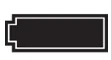 | Controller running on battery power. |
| 3 | Flashing | 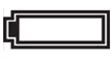 | Empty battery, replace batteries or switch to A/C power. |
| 4 | Flashing |  | Low battery, replace batteries or switch to A/C power. |
| The LED flashes and the battery symbol is blinking during treatment | |||
| 5 | Flashing |  | Bad or missing Connection Cord. Check Connection Cord between Handset and Controller. Bad or missing Aerosol Head. Correct then restart Controller. |
| Lamira turns on but the LED flashes and the LCD display flashes this symbol | |||
| 6 | Flashing |  | No ARIKAYCE detected. Add ARIKAYCE. If you have already added ARIKAYCE, gently tap the Handset, hold the Handset level and restart the Controller. |
| Lamira beeps 1x, then beeps high-low with the LED flashing and the LCD display flashing this symbol | |||
| 7 | Flashing |  | Have reached 20 minute maximum time and will shut down. If ARIKAYCE remains, restart the Controller. After treatment is complete, clean and disinfect the Handset including the Aerosol Head. |
| Lamira beeps low-high 3 times, the LED flashes, the LCD displays this symbol and then turns off | |||
| 8 | Steady | 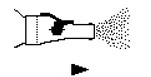 | Misting and working properly. |
| Lamira beeps 1 time and LCD shows this symbol | |||
| 9 | Steady | 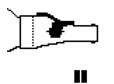 | Controller has paused. To resume press On/Off button. |
| 10 | Flashing | 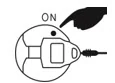 | Press button to start treatment. |
| 11 | Brief |  | Functioning properly, the Controller has started properly. |
| 12 | Brief | 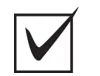 | No ARIKAYCE remaining, your treatment is done. If ARIKAYCE is remaining, your Handset might be tilted. Keep Handset level, gently tap Handset and restart Controller. |
| The Lamira beeps 2 times, displays this checkmark symbol, then turns off. | |||
| 13 | The Lamira cannot be activated and no green LED, no screen, and no beep. | Bad, missing or misloaded batteries. Bad or missing A/C Power Supply. | |
| 14 | The Lamira beeps 1 time and begins to produce a mist, then stops and shuts off with no beep, no LED, and with ARIKAYCE still present. | Bad batteries or bad A/C Power Supply. Replace batteries or A/C Power Supply and restart Controller. | |
| 15 | The Lamira stops before ARIKAYCE is completely used up. | Lost power. Replace batteries or use A/C Power Supply. Tilted Handset. Keep Handset level, gently tap Handset and restart Controller. Lost power while using the A/C Power Supply. It is recommended to keep batteries inserted in the device as backup in case power is interrupted while using the A/C Power Supply. Doing so can help avoid treatment disruptions. | |
| 16 | The Lamira does not stop automatically after all ARIKAYCE is consumed. | Clean and disinfect the Aerosol Head. If condition continues, contact the inLighten Patient Support Program at 1-833-LIGHT-00 (1-833-544-4800). | |
| 17 | Longer than normal nebulization time. | Aerosol Head is dirty. Clean and disinfect the Aerosol Head. Replace the Aerosol Head with a new one from your kit after 7 uses. | |
| 18 | Handset leaks. | Make sure Blue Valve is placed correctly in the Handset and the 2 flaps point into the Handset Chamber (see Section H). Make sure Aerosol Head is correctly placed in the Handset. It is normal to have some liquid collect in the Aerosol Chamber and Mouthpiece. The amount depends on the volume of the ARIKAYCE and on your breathing pattern. | |
| 19 |  | The On button was accidently pressed for 10 seconds, which activated the easycare function. The easycare is an accessory that assists in cleaning the Aerosol Head but it is not used for your Lamira. Press the On button briefly to turn-off the Controller and stop the easycare function. | |
L Specifications
| Mechanical | |
| Weight: Controller and Handset | approx. 8.2 oz. |
| Weight: Controller, Handset, and Batteries | approx. 11 oz. |
| Handset Dimensions (W × H × D) | 2.0" × 2.4" × 5.5" |
| Controller Dimensions (H × Ø) | 1.6" × 4.6" |
| Minimum Fill Volume | 0.5 mL |
| Maximum Fill Volume | 8.4 mL |
| Electrical | |
| Electrical Requirements | 110 V - 240 V, 50 Hz/60 Hz |
| Power Wattage | 2.0 Watts under normal load |
| Transport and Storage | |
| Temperature | -13° to 158° F |
| Relative Humidity (non-condensing) | 0% to 93% |
| Air Pressure | 9 to 15 PSI |
| Operational | |
| Temperature | 41° to 104° F |
| Relative Humidity (non-condensing) | 15% to 93% |
| Air Pressure | 10 to 15 PSI |
| Device Classification According to IEC 60601-1 | |
| Type of electric shock protection (A/C Power Supply) | Protection Class II |
| Degree of protection from electric shock of part used (nebulizer) | Type BF |
| Degree of protection against water ingress per IEC 60529 IP rating (controller) | IP 22 |
| Degree of protection when in the presence of flammable mixtures | No protection |
| Continuous operation | Operating mode |
Device Performance Characteristics
| Mean | RangeRange - two-sided tolerance interval, proportion of total population=0.95 | |
|---|---|---|
| Total Delivered Dose by Breath SimulationBreath simulation - tidal volume of 500 mL, 15 breath per minutes, and inhalation:exhalation ratio is 50:50 (mg) | 312.1 | 273.8 – 350.4 |
| Total Delivered Dose by Breath Simulation (% of label claimlabel claim - 590 mg) | 52.9 | 46.4 – 59.4 |
| MMADMMAD - Mass Median Aerodynamic Diameter by NGINGI - Next Generation Impactor (µm) | 4.45 | 4.38 – 4.52 |
| GSDGSD - Geometric Standard Deviation | 1.59 | 1.59 – 1.60 |
| Respiratory Dose by NGI (≤ 5µm, mg) | 327.1 | 316.5 – 337.6 |
| Respiratory Fraction by NGI (≤5µm, % of delivered dose) | 55.6 | 53.8 – 57.4 |
Handset materials
Polypropylene, polyamide, silicone, stainless steel, thermoplastic elastomers. Does not contain any natural rubber (latex).
Disposal
The Lamira components and batteries must be disposed of in accordance with local (state, county or municipal) regulations.
Manufactured by:
PARI Respiratory Equipment, Inc.
2412 PARI Way
Midlothian, Virginia 23112 USA
For patent information: www.PARI.com/ip
©2018 PARI Pharma GmbH. All rights reserved. The PARI logo is a registered trademark of PARI GmbH. Lamira®, Altera®, eRapid®, and eFlow® logo are registered trademarks of PARI Pharma GmbH. Insmed®, ARIKAYCE®, and inLighten™ are trademarks of Insmed Incorporated.
This Instructions for Use has been approved by the U.S. Food and Drug Administration
678D0204
Rev D 01/25
Instructions for Use
ARIKAYCE® LIMITED POPULATION
(amikacin liposome inhalation suspension)
For oral inhalation use
Lamira® Nebulizer System
Before using your Lamira Nebulizer System, be sure you read and understand the detailed information in the full Instructions for Use that comes with the Lamira Nebulizer System. This will provide more complete information about how to put together (assemble), prepare, use, clean, and disinfect your Lamira Nebulizer System. If you do not understand any part of the instructions, contact Insmed inLighten ® Patient Support at 1-833-LIGHT-00 (1-833-544-4800) before using the Lamira Nebulizer System.
| Gather your ARIKAYCE medicine. The ARIKAYCE 28-day kit contains: | |
| |
| Check to make sure you have all the necessary parts for your Lamira Nebulizer System: | |
| 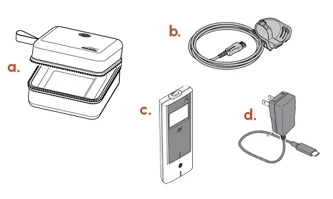 |
Spare Lamira Nebulizer Handset:
| 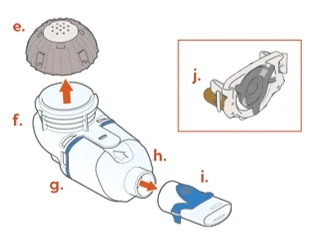 |
| You will also need the following supplies that do not come in your ARIKAYCE 28-day kit that will help you care for your Lamira Nebulizer System: | |
| |
| Charging your Lamira | |
Do not insert the A/C Power into the bottom of the Controller. | 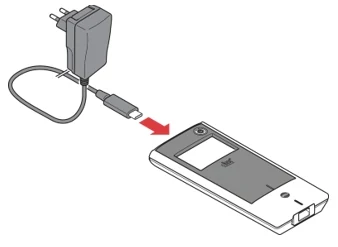 |
Cleaning and Disinfecting
Before first use, rinse, clean, and disinfect your Handset and Aerosol Head. Moving forward, rinse, clean, and disinfect the Handset including the Aerosol Head after every use.
When you receive your Handset and Aerosol Head, they will not be sterile. Cleaning and disinfecting your Handset and Aerosol Head is important to reduce the risk of infection, illness, and contamination.
| |
| 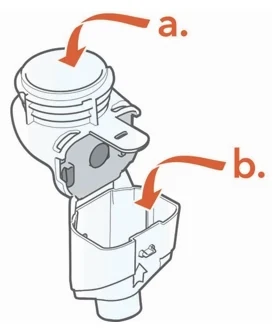 |
| 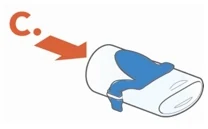 |
| 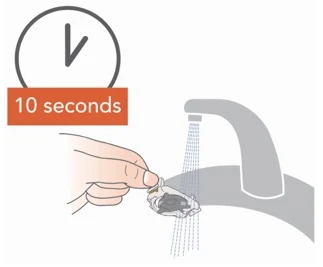 |
| 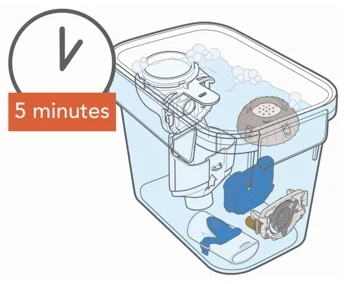 |
| |
|  |
| 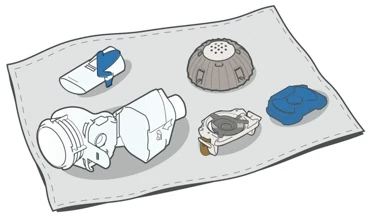 |
Assembling Your Handset
| Step 1: Wash your hands with soap and water , and dry them well. | 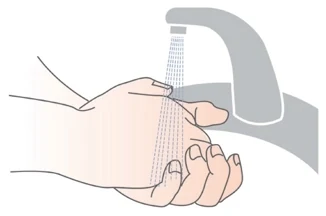 |
Step 2: Insert the Blue Valve. Open the Handset by gently pulling up on the tab of the Medication Reservoir. Insert the Blue Valve so that it rests on top of the Aerosol Chamber with the 2 valve flaps facing down (valve flaps not bent). | 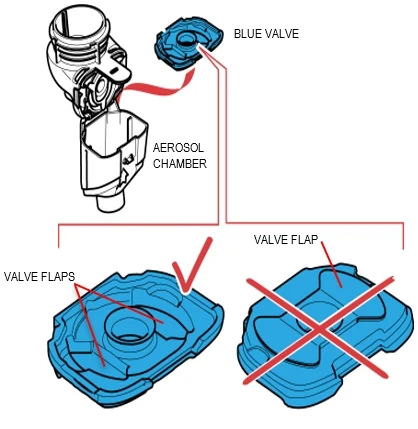 |
| Step 3: Insert the Aerosol Head. | |
Grasp the Aerosol Head by the 2 flexible plastic tabs on each side. Be sure the text "Lamira®" is facing toward you and is at the top of the Aerosol Head. Squeeze the 2 flexible plastic tabs together while inserting the Aerosol Head into the Medication Reservoir. Close the Handset when you are done (no gaps along blue valve edge). Do not touch the silver part of the Aerosol Head at any time. After the Aerosol Head has been used 7 times, throw away (dispose of) and replace with a new one during the cleaning process. The Lamira Handset is to be used for 28 days. | 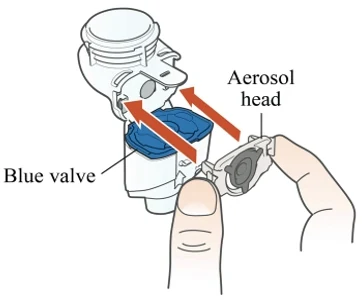 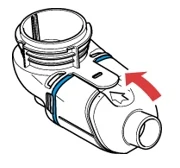 |
| Step 4: Attach the Mouthpiece to your Handset with the Blue Flap facing up. | 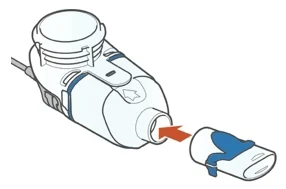 |
| Step 5: Finally, attach the Handset to the Controller. | |
| 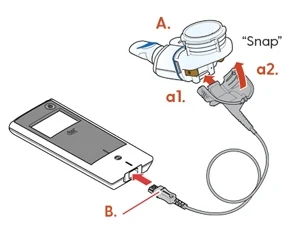 |
Taking ARIKAYCE
Your ARIKAYCE should be at room temperature before use to make sure that your Lamira Nebulizer System operates properly. Do not use other medicines in your Handset.
Bring ARIKAYCE to room temperature by removing it from the refrigerator at least 45 minutes before use. Do not use if your ARIKAYCE has been frozen.
Step 1: Get your ARIKAYCE ready.
|  |
| How to open the ARIKAYCE vial | |
|  |
|  |
|  |
|  |
| 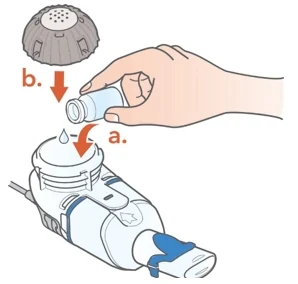 |
| Step 2: Sit in a relaxed, upright position. | |
| 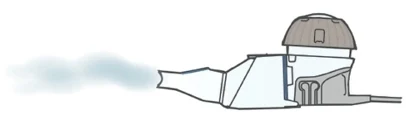 |
Step 3: Insert the Mouthpiece (but do not cover the blue flap) and take slow, deep breaths.
Be sure to hold the Handset level throughout the treatment. | 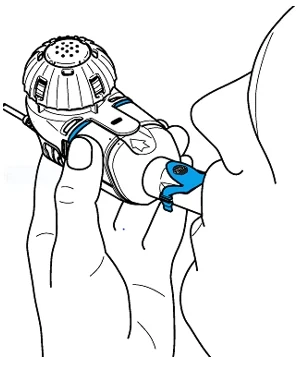 |
| Step 4: Check that your treatment has ended. | |
| 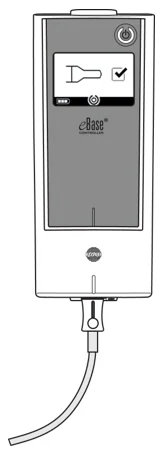 |
| For any issues you may have with your Lamira Nebulizer System, see Section K – Frequently Asked Questions and Section L – Troubleshooting of the full Instructions for Use that comes with your medicine. | |
Cleaning your Lamira Handset and Aerosol Head After Use
- Rinse, clean, and disinfect handset right away after each use to reduce infection, illness, and contamination.
- Disinfect the Handset and Aerosol Head after every use.
- See "Cleaning and Disinfecting" at the beginning of the Instructions for Use on how to properly clean and disinfect your handset and aerosol head.
© 2018 Insmed Incorporated. All rights reserved. Insmed, ARIKAYCE, and inLighten are registered trademarks of Insmed Incorporated. Lamira is a registered trademark of PARI Pharma GmbH.
This Instructions for Use has been approved by the U.S. Food and Drug Administration.
Issued: 7/2026
A Table of Contents and Introduction
| Table of Contents | |
|---|---|
| A. Introduction | 1 |
| B. Safety Precautions | 2 |
| C. Getting Started | 3 |
| D. Charging Your Lamira | 4 |
| E. Maintaining Your Lamira | 5 |
| F. Cleaning Your Lamira | 6 |
| G. Disinfecting Your Lamira | 9 |
| H. Assembling Your Lamira Handset | 10 |
| I. Taking ARIKAYCE | 13 |
| J. Controller Settings | 16 |
| K. Frequently Asked Questions | 18 |
| L. Troubleshooting | 19 |
| M. Specifications | 21 |
| Introduction |
The Lamira® Nebulizer System (Lamira) is a battery operated electronic nebulizer, which vibrates and forces liquid ARIKAYCE® (amikacin liposome inhalation suspension) through thousands of small holes to form an aerosol mist for inhalation.
These Instructions for Use contain information and safety precautions for the Lamira nebulizer that is made just for the medicine ARIKAYCE. Do not use any other medicine in the Lamira nebulizer.
Before using your Lamira nebulizer, read and understand all the Instructions for Use and save them for future reference. If you do not understand any part of these directions, contact the Insmed® inLighten® Patient Support Program at 1-833-LIGHT-00 (1-833-544-4800) before using the Lamira nebulizer.
To reduce the risk of infection, illness, or injury from contamination or improper use, it is important to complete the following 2 steps:
- 1) Before first use, rinse and clean the Handset including the Aerosol Head. Moving forward, rinse and clean the Handset including the Aerosol Head right after each use (see Section F). Do not wash the Controller, Connection Cord, or A/C Power Supply. Use clear liquid soap made for washing dishes to clean the Handset including the Aerosol Head. Do not use liquid dish soaps that are white or antibacterial liquid dish soaps because these may contain additives harmful to the Aerosol Head.
- 2) Before first use, disinfect the Handset including the Aerosol Head. Moving forward, disinfect the Handset including the Aerosol Head after every use (see Section G).
Take special note of all safety precautions marked Danger and Warning.
Indications for use
Limited by Federal Law for use only with ARIKAYCE.
B Safety Precautions
Read all dangers and warnings before using.
|
 To reduce the risk of fatal injury from electrocution:
To reduce the risk of serious injury:
- The Lamira Nebulizer Handset (Handset) is for single patient use. Do not share your Handset with other people.
- The Handset is made just for ARIKAYCE. Never use other medicine in the Handset. Using other medicine in the Lamira nebulizer can result in severe injury or death.
- Read, understand and follow all warnings and instructions in these Instructions for Use before using the Lamira nebulizer.
To reduce the risk of fire, burns and damage or malfunction of the Controller:
- Do not overload wall outlets or use extension cords.
- Keep all electrical cords away from heated surfaces.
- Do not spray liquids onto the housing of the Controller (Controller). (See Section C: Getting Started) Liquid may cause damage to the electrical parts and could lead to a malfunction. If liquids enter the Controller, contact the inLighten Patient Support Program at 1-833-LIGHT-00 (1-833-544-4800).
- Do not insert any object into any opening on the Lamira.
- Do not operate where oxygen is being given in a closed environment such as an oxygen tent.
- Always unplug the Lamira right after using and before cleaning.
- Before use, check your Lamira for proper assembly. All parts must be connected and firmly in place. Use of an improperly assembled Lamira could decrease or stop the effectiveness of your treatment.
- Use only adapters and accessories that are made for the Lamira. Use of unapproved adapters or accessories can lead to improper administration, injury, leading to damage to the Controller.
- Never substitute the Handset for any other eFlow® Technology Handset such as Altera®, eRapid® or any other eFlow®. Never use the Lamira Aerosol Head (Aerosol Head) in any other eFlow® Technology Handset. This Aerosol Head has unique performance characteristics for ARIKAYCE.
- Never operate the Controller if it is improperly or incompletely assembled or damaged. See Section K: Troubleshooting for more information about alerts that appear when the Lamira is improperly assembled or might be damaged.
Never operate the Lamira if:
- It has damaged cords or plugs,
- it is not working properly,
- it has been dropped or damaged,
- the Controller has been exposed to liquids
- To reduce the risk of infection, illness, or injury from contamination, clean and dry all parts of the Handset after each use. Follow the instructions in Section E to maintain and clean the Lamira.
- Cleaning the Handset properly will help prevent the Aerosol Head from clogging. Replace the Aerosol Head with a new one after 7 uses. Lamira Handset is to be used for 28 days. If the Aerosol Head becomes clogged, the aerosol mist will be reduced, which may increase your inhalation time of therapy. If clogging occurs, use the instructions in Section F to clean the Aerosol Head.
- Cleaning the Handset and Aerosol Head only removes the medicine and saliva. To reduce the risk of serious or fatal illness caused by contamination of the Handset, you must also disinfect the Handset and Aerosol Head after every cleaning. See Section G for disinfection instructions.
- The Lamira contains small parts that may become a choking hazard to small children. The Lamira Connection Cord (Connection Cord) also may become a strangulation hazard.
- Do not allow pets, for example dogs or rodents, near the cables.
- Keep the Lamira out of reach of children.
- Keep the Handset level when in use. Excessive tilting can cause the Controller to shut off leaving unused ARIKAYCE in the Medication Reservoir and resulting in incomplete dosing.
- Closely supervise use when the Lamira is used near children or the physically or mentally impaired.
- Do not use your Lamira while driving or in any situation which takes away your full attention.
- If the Lamira has been damaged or is not operating properly, contact the inLighten Patient Support Program at 1-833-LIGHT-00 (1-833-544-4800).
- Do not take the Controller apart at any time. There are no user serviceable parts inside the Controller. Contact the inLighten Patient Support Program at 1-833-LIGHT-00 (1-833-544-4800) for all Controller service needs.
- Do not modify this equipment without authorization from the manufacturer.
- Do not use the device in areas exposed to elevated electromagnetic or electrical radiation such as a MRI scanner or high frequency surgical equipment.
- Do not place near other medical devices during operation unless both devices are monitored constantly to make sure both are operating properly.
- Do not use within 12 inches (30 cm) of portable wireless communication devices such as cell phones or antenna cables or external antennas.
- Do not use near airplane or train control systems. Do not use aboard aircraft.
- Do not use the nebulizer near anti-theft systems and Radio Frequency Identification (RFID) readers, which are used in a wide variety of settings, including stores, libraries, and hospitals. Do not power on the nebulizer when passing through security screening or theft protection (RFID) systems at entrances or exits of stores, libraries or hospitals. Note that some entrance and exit security systems are not visible.
Technical electromagnetic compatibility data is available in table form upon request from PARI Pharma GmbH or on the internet at https://www.pari.com/fileadmin/Electromagnetic-compatibility-4.pdf
C Getting Started
| Step C1: | Gather your dosing supplies:
|
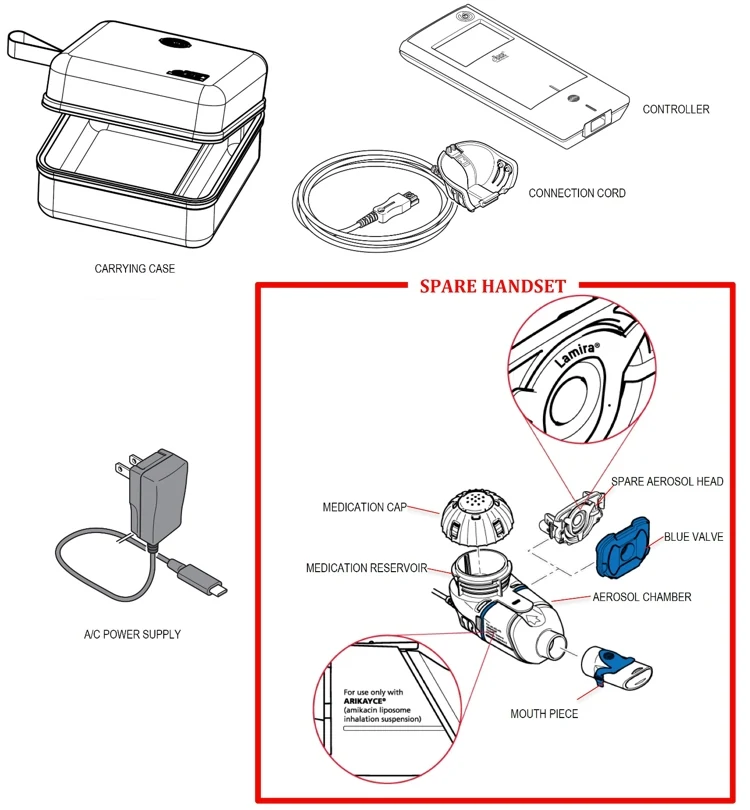
| Step C2: | Check your Lamira Nebulizer System package to make sure you have the items shown below. Note that the package contains a Handset that should be set aside as a spare. If anything looks damaged, contact the inLighten Patient Support Program at 1-833-LIGHT-00 (1-833-544-4800). |
 | |
D Charging Your Lamira
| The Controller runs with an integrated battery pack and can be recharged at any time. | ||
| Using the A/C Power Supply: The A/C power supply will automatically adjust to the incoming voltage and will charge the controller's integrated battery pack. It can be used worldwide but requires "Plug Converters" for use outside the USA. | ||
| Step D1: | Plug the A/C power supply into the controller. The power cord socket is located on the top of the controller. Push the end of the A/C power supply cord into the power cord socket [D-1a]. Do not attempt to insert the power cord into the bottom of the controller (D-1). | 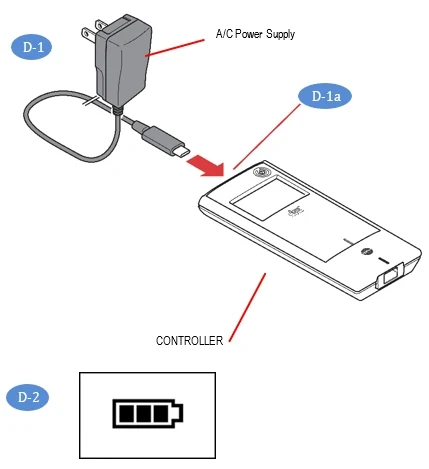 |
| Step D2: | Plug the A/C power supply into the wall outlet. The A/C power supply will charge the battery pack in the controller. As soon as the charging process is completed, you will see a fully charged battery pack (D-2). | |
NOTE: To preserve the battery pack life, it is recommended to:
| ||
E Maintaining Your Lamira
|

|
Handset Maintenance Summary (see the next page for complete instructions)
| Instruction | When | Parts cleaned | Method | How Long | Comments |
|---|---|---|---|---|---|
| Wipe | After each use |
| Wipe with clean disposable paper towel. | 1 second per part | Wipe to remove residual medicine and then dispose of paper towel in trash with solid waste. |
| Rinse | Prior to first use and after each use |
| Warm running tap water. | 10 seconds | Rinse each side of the Aerosol Head for 10 seconds. |
| Clean | Prior to first use and after each use |
| Soak each piece in warm soapy water. While soaking swish or shake each piece. | 5 minutes | Use 3 to 5 drops of clear liquid dish soap in a bowl with enough warm water to cover all pieces. Soak longer if Handset has dried or if visibly dirty. |
| Rinse | Prior to first use and after each use |
| Warm running tap water. | Until soap is removed. | Check each part and soak for another 5 minutes if any part looks dirty. |
| Disinfect | Prior to first use and after each use |
| Boil in distilled water. | 5 minutes | Air-dry in a dust-free environment. |
F Cleaning Your Lamira
 Your Handset including the Aerosol Head is not sterile. Contamination and moisture may cause the growth of bacteria, and the Aerosol Head can be affected by ARIKAYCE left over in it. Before first use, it is important to rinse, clean, and disinfect your Handset including the Aerosol Head. Moving forward, rinse, clean, and disinfect the Handset including the Aerosol Head right after every use. If your Handset or Aerosol Head looks dirty, soak the parts in soapy water for longer than 5 minutes. Do not place the Handset or the Aerosol Head in a dishwasher.
| Cleaning your Handset | |||
|---|---|---|---|
| Step F1: | Disconnect your Handset from the Connection Cord (F-1). | 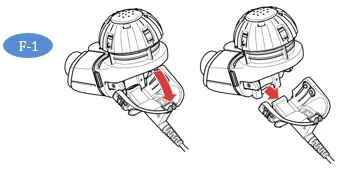 | |
| Step F2: | Remove the Medication Cap by turning counterclockwise and pulling straight up (F-2). | 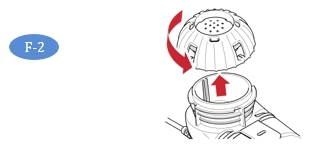 | |
| Step F3: | Remove the Mouthpiece from the Aerosol Chamber by pulling straight off (F-3). The Blue Flap must still be attached to the mouthpiece as shown in the picture. | 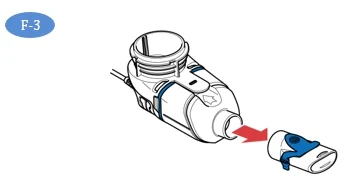 | |
| Step F4: | Gently pull up on the tab to open the Handset and remove the Blue Valve (F-4). | 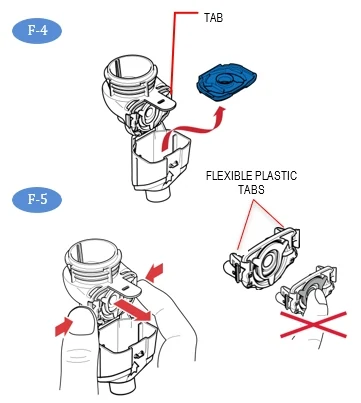 | |
| Step F5: | Being careful to touch only the plastic outer ring of the Aerosol Head, press the 2 flexible plastic tabs on the side of the Aerosol Head towards each other and remove (F-5). After the Aerosol Head has been used 7 times, throw away (dispose of) and replace with a new one. | ||
| Do not touch the center silver part of the Aerosol Head. | |||
| Step F6: | Gently wipe away any drops of medicine from the Medication Reservoir (F-6a), Aerosol Chamber (F-6b) and Mouthpiece (F-6c) before rinsing to reduce antibiotics added to water systems. Use only plain, dry paper towels or wipes. Do not use towels or wipes that have any chemicals added to them such as alcohol, lotion, or baby wipes. Be careful not to harm the parts. Do not wipe the Aerosol Head. Throw away paper towels by disposing in trash with solid waste. | 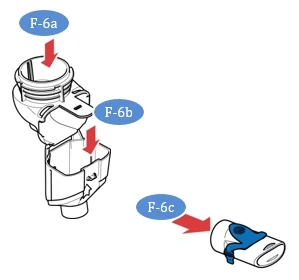 | |
| Step F7: | Rinse each of the parts under warm running tap water for 10 seconds. Pay special attention to rinsing the Aerosol Head and rinse each side of the Aerosol Head for 10 seconds (F-7). Thorough rinsing of both sides of the Aerosol Head helps to prevent clogging and makes sure the Aerosol Head works properly. Never use a brush or any other object to clean the Aerosol Head. | 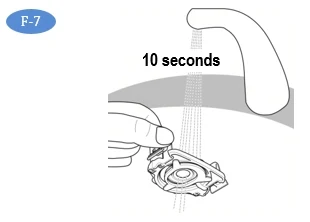 | |
| Step F8: | Clean all Handset parts by adding a few drops of clear liquid dish soap and warm tap water to a clean tub or bowl. Cover the Handset parts in the warm soapy water and soak for 5 minutes, shaking them periodically (F-8). | 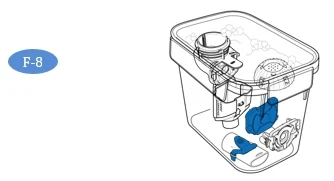 | |
| Step F9: | Rinse all parts thoroughly under warm running tap water to remove soap (F-9). Check each part and soak for another 5 minutes if any of the parts look dirty. After all parts are cleaned and free from soap, disinfect your Handset. | 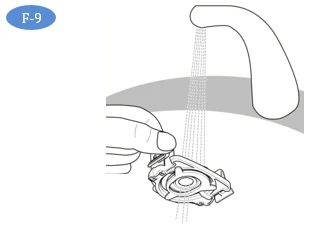 | |
| Step F10: | Disinfect the Handset including the Aerosol Head after cleaning. In addition to cleaning ARIKAYCE from your Handset, you must also disinfect your Handset to remove bacteria and avoid infection. See Section G for instructions on how to disinfect your Lamira Handset. | ||
| Cleaning your Controller, Connection Cord and A/C Power Supply | |||
| Step F11: | To reduce the risk of electric shock, disconnect all connections before cleaning. Switch off the Controller. Remove the Connection Cord and A/C Power Supply cord from the Controller. | 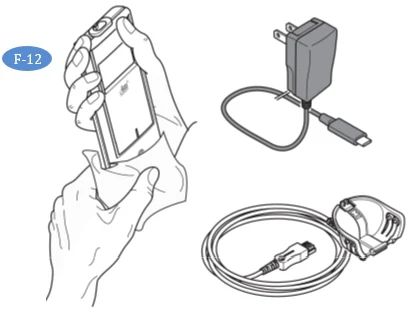 | |
| Step F12: | Clean the Controller housing, Connection Cord and A/C Power supply as needed with a soft, clean, damp cloth (F-12). Do not place the Controller unit under water or allow liquid to get inside the Controller. Make sure moisture from the cloth does not enter the Controller. | ||
| Never let the Controller come in contact with water or cleaning agents. If liquid does get into the Controller, contact the inLighten Patient Support Program. | |||
G Disinfecting Your Lamira
| To prevent serious or fatal illness or injury caused by contamination, disinfect your Handset including the Aerosol Head after every use. | ||
| Step G1: | Clean your Handset right after every use with soapy water as described in Section F. | |
| Step G2: | Disinfect your Handset at the end of every day by boiling in distilled water. To disinfect with boiling water,
| |
| Step G3: | Air dry on a lint-free towel (G-3). After the parts are completely dry, wrap them in a lint-free towel for storage. Reassemble just before taking your next treatment. This is to make sure the Blue Valve will not become damaged. | 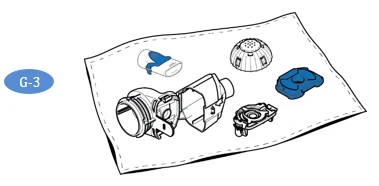 |
H Assembling Your Lamira Handset
| Your Handset including the Aerosol Head is not sterile. Before first use, rinse, clean, and disinfect your Handset (See Section F). Moving forward, rinse, clean, and disinfect the Handset right after each use (See Section G). Inspect all parts to make sure they are cleaned and are not visibly damaged. Do not use dirty or damaged parts. | |||
| Clean and disinfect your Handset before the first time you use it. | |||
| Step H1: | Clean and Disinfect your Handset before the first time you use it. See Sections F and G. | ||
| Step H2: | Wash your hands with soap and water and dry them well (H-2). | 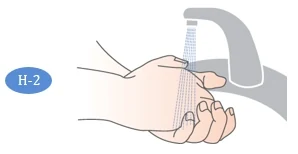 | |
| Step H3: | Open the Handset. The Medication Reservoir and the Aerosol Chamber are attached using a "hinge". First, gently pull up on the tab of the Medication Reservoir (H-3). This will release the Aerosol Chamber so that you may open it. | 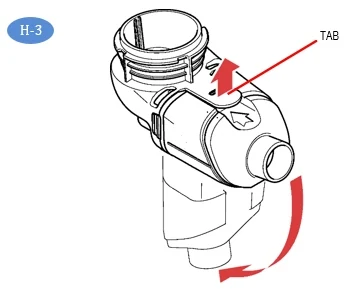 | |
| Step H4: | Insert the Blue Valve on top of the Aerosol Chamber (H-4). Make sure the 2 valve flaps are positioned down (valve flaps not bent) as shown in H-4a. Do not push the Blue Valve inside of the Aerosol Chamber. The Blue Valve should be placed on top of the Aerosol Chamber. | 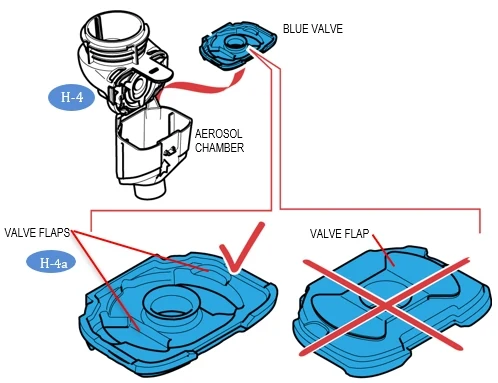 | |
| Step H5: | Insert the Aerosol Head Note: It is important that you do not touch the silver part of the Aerosol Head at any time during assembly (H-5a). | 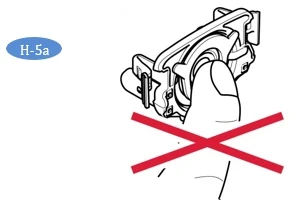 | |
| Check to make sure the Aerosol Head is labeled "Lamira®". Do not use other eFlow Technology Aerosol Heads in the Lamira (H-5b). | 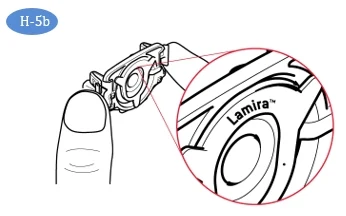 | ||
| Carefully grasp the Aerosol Head by the 2 flexible plastic tabs on each side of the Aerosol Head. Turn the Aerosol Head so that "Lamira®" is facing toward you and is at the top of the Aerosol Head (H-5b). | |||
| Squeeze the two flexible plastic tabs together while inserting the metal arms and flexible plastic tabs into the Medication Reservoir (H-5c). You should feel the flexible plastic tabs "grab" as you insert it. | 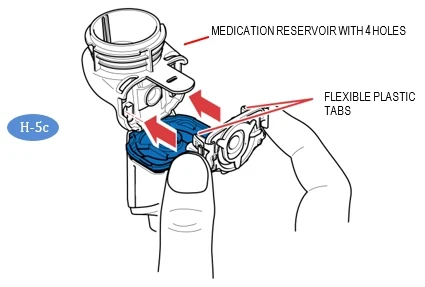 | ||
| Step H6: | Close your Handset by pushing the Aerosol Chamber together with the Medication Reservoir until you hear a "snap" (no gaps along the blue valve edge) (H-6). If you do not hear a snap, open the Handset and check that the Blue Valve is seated properly (See Step H-4 ). | 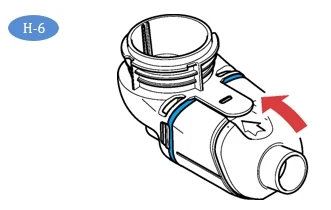 | |
| Step H7: | Attach Mouthpiece to your Handset. Make sure the Blue Flap is facing up (H-7) and is pressed in the slot on the Mouthpiece. Push the Mouthpiece straight onto the Handset. Make sure the Mouthpiece stays attached to the Handset during treatment. | 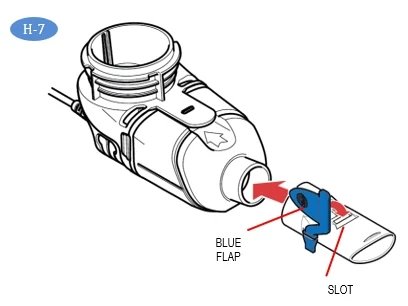 | |
| Step H8: | Attach the Connection Cord by lining up the bottom of the Connector with the bottom of the Handset (H-8a) and pushing the Connection Cord upward against the rear underside of the Handset (H-8b) until you hear the parts snap together. | 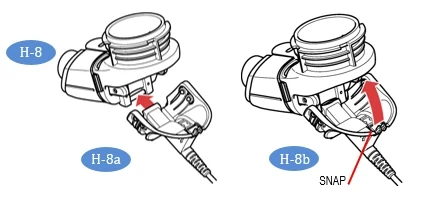 | |
| Step H9: | Connect the Connection Cord to the Controller. Push the rectangular end of the Connection Cord (H-9a) into the plug inlet port located at the bottom of the controller (H-9). Place the Controller with the attached Handset on a clean, flat, stable surface. | 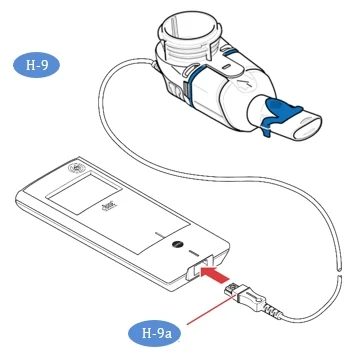 | |
I Taking ARIKAYCE
Important information to know before you start
Getting your ARIKAYCE ready before adding it to the Lamira Nebulizer Handset. | Your ARIKAYCE should be at room temperature before use to make sure that your Lamira operates properly. Bring ARIKAYCE to room temperature by removing it from the refrigerator at least 45 minutes before use. Do not use if your ARIKAYCE has been frozen. Do not use other medicine in your Handset. | |
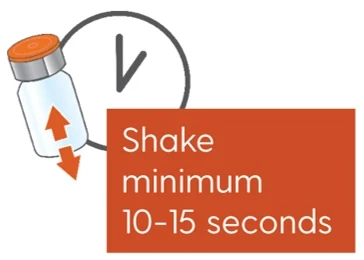
| Step I1: | Shake the ARIKAYCE vial well for a minimum of 10 to 15 seconds, AND UNTIL THE MEDICINE LOOKS THE SAME THROUGHOUT AND WELL MIXED (I-1). | 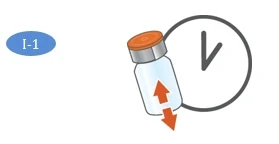 |
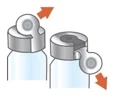
| Step I2: | Lift orange cap from vial and throw away (dispose of) the orange cap (I-2). | 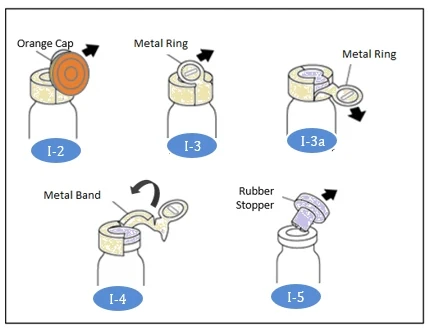 |
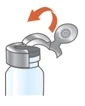
| Step I3: | Grip metal ring on top of the vial. Pull it down gently (I-3) until 1 side breaks away from the vial (I-3a). | |
| Step I4: | Pull the metal band from around the vial top in a circular motion until it comes off completely from the vial (I-4). Throw away (dispose of) the metal band after it is removed. | |
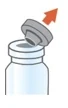
| Step I5: | Carefully remove the rubber stopper by pulling it upward (I-5). | |
| Step I6: | Make sure your Handset is placed on a clean, flat, stable surface. Pour 1 vial of ARIKAYCE into the Medication Reservoir (I-6). Do not use more than 1 vial for each treatment. | 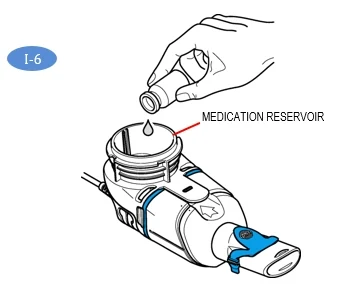 |
| Step I7: | Attach the Medication Cap by lining up the Tabs on the Medication Cap with the Tab Slots on the Medication Reservoir (I-7). Turn the Medication Cap clockwise until it stops. As the Medication Cap is turned, the inner cap of the Medication Cap should rise. | 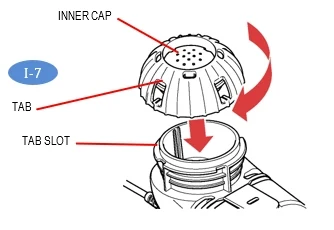 |
| Step I8: | To begin your treatment, sit in a relaxed, upright position. Press and hold the On/Off button (I-8) until the start screen appears on the LCD display (I-8a). You will also hear 1 "beep". The Lamira is now On. | 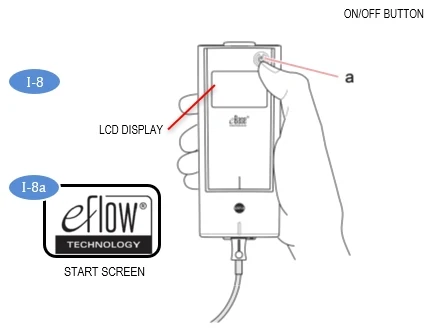 |
You will see a timer counting down from 3 to 1 before treatment starts (I-8b). Aerosol will begin to flow into the aerosol chamber of the nebulizer handset. The controller will display the treatment screen (I-8c). | 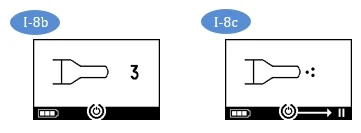 | |
| Step I9: | Insert the Mouthpiece by placing it on top of your bottom lip and tongue. Close your lips around the Mouthpiece but do not cover the blue flap (I-9). Take slow, deep breaths then breathe normally in and out through the Mouthpiece until your treatment is complete. Your treatment should take about 14 minutes, but could take up to 20 minutes. | 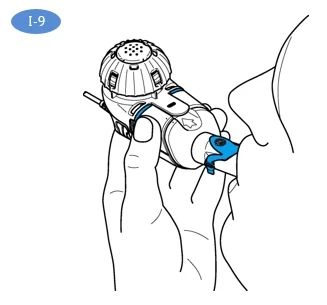 |
| Hold the Handset level throughout your treatment. If the Handset is held at an angle over 45 degrees (I-9a), it will sound 2 beeps and shut off after 30 seconds. If this occurs, hold the Handset level and press the On/Off Button to start your treatment again. | 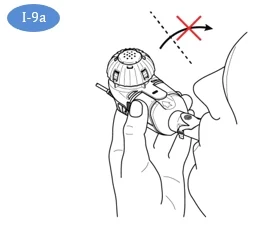 | |
| Note: | The Lamira can be paused at any time during operation by pressing the On/Off button. The screen will go from On (I-9b) to Pause (I-9c), and an alarm tone will sound. To resume your treatment, press the Controller On/Off button. The Controller will run for up to 20 minutes. If your treatment is not complete after 20 minutes, press the On/Off button to continue treatment. | 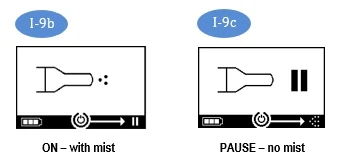 |
Important Information: The amount of time to nebulize your ARIKAYCE may change from dose to dose and may become longer unless the cleaning and maintenance instructions are followed (See Maintaining Your Lamira). | ||
| Step I10: | At the end of your treatment, the following will happen:
| 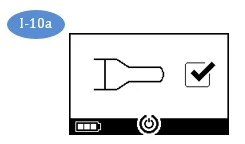 |
Always check the Medication Reservoir by removing the Medication Cap (I-10b) to make sure you have completed your dose. If more than a few drops of ARIKAYCE remains, replace the Medication Cap (I-10c) and press On/Off start button and complete your dose. Change your Aerosol Head after 7 uses. After the Aerosol Head has been used 7 times, replace it with a new Aerosol Head during the cleaning process. Follow the instructions in Steps F6 through F9 and replace the Aerosol Head with a new one. Change your Handset after 28 days. After the Handset has been used for 28 days, replace it with a new Handset during the cleaning process. | 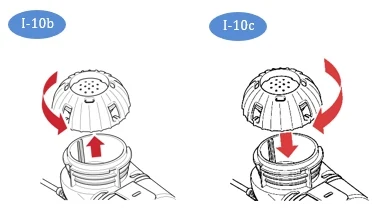 Important: Clean and disinfect your Handset after each use. See sections F and G for instructions. Change your Aerosol Head after 7 uses. Lamira Handset is to be used for 28 days. | |
J Controller Settings
| Changing the sound and backlight settings of your eBase® Controller: | ||
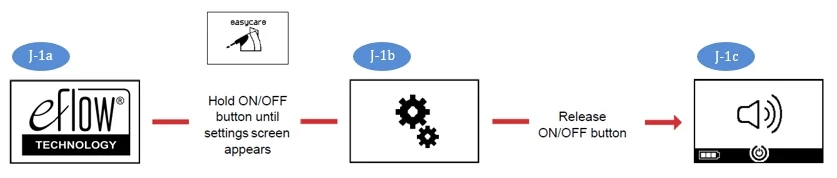
| Step J1: | Enter the settings mode. Press and hold-down the ON/OFF button (J-1) until you skip the easycare screen. When the settings screen appears (J-1b), release the ON/OFF button. You will hear one "beep" and see the sound default setting screen (J-1c). | 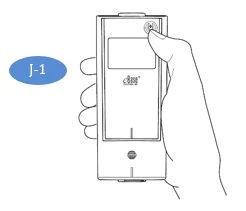 |
 | ||
| Step J2: | Change sound settings. By pressing the ON/OFF button you can choose between the options: "Default" (J-2a), "Reduced signal tones" for one single beep for status feedback (J-2b) and "All signal tones OFF" (J-2c). | 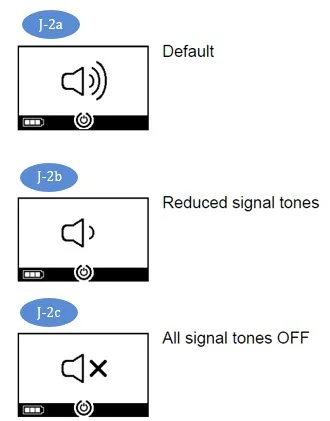 |
| Step J3: | Apply preferred sound setting. Choose your preferred setting. Wait until the controller automatically saves the selection after a few seconds. The controller confirms this with a checkmark (J-3). | 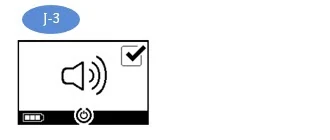 |
| Step J4: | Change backlight settings. After the sound setting has been saved, the device will prompt you to choose the backlight setting. By pressing the ON/OFF button you can choose between the options "Default" (J-4a), "Backlight always ON" (J-4b) and "Backlight always OFF" (J-4c). In the delivered state, the option "Default" is selected: Backlight switches on for 1 second when button is pressed, or the device status changes. | 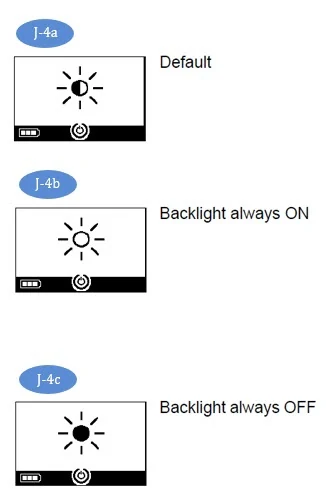 |
| Step J5: | Apply preferred backlight setting. Choose your preferred setting. Wait until the controller automatically saves the selection after a few seconds. The controller confirms this with a checkmark (J-5). | 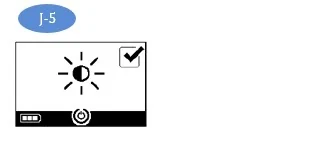 |
| Step J6: | After the backlight setting has been saved, the controller will shut off. | |
K Frequently Asked Questions
QUESTION 1: How long should my ARIKAYCE treatment take?
- Answer: With normal operation and proper cleaning, your Handset should deliver 1 vial of ARIKAYCE in about 14 minutes but could take up to 20 minutes. Your Lamira should automatically shut off shortly after your treatment is complete or after 20 minutes. If the Lamira turns off after 20 minutes, check the Medication Reservoir. If it is empty, you have received your full dose.
QUESTION 2: How much ARIKAYCE should be left in the Medication Reservoir at the end of my treatment?
- Answer: Only a drop of ARIKAYCE should remain in the Medication Reservoir. If more than a drop remains, start the Controller and complete your dose. Then clean the Aerosol Head (Section F). If after proper cleaning, more than a drop remains in the Medication Reservoir, contact the inLighten Patient Support Program at 1-833-LIGHT-00 (1-833-544-4800).
QUESTION 3: When I turn on my Nebulizer, nothing happens. There does not seem to be any power.
Answer: Connect the A/C Power Supply to take your treatment and keep A/C power supply plugged in to recharge the battery pack.
Answer: If you are using the A/C Power Supply, check the connection to be sure it is firmly connected to the A/C Power Supply Port located underneath the battery pack Compartment.
Be sure that the A/C Power Supply is plugged into a working wall outlet.
QUESTION 4: Sometimes I have trouble removing the Medication Cap at the end of my therapy session.
- Answer: A vacuum has formed in the Medication Reservoir. Remove the Connection Cord, open the Handset and carefully remove the Aerosol Head. The Medication Cap will then be easier to remove.
QUESTION 5: What if no mist is coming out of your Handset?
- Answer: First, make sure ARIKAYCE is at room temperature before use. If ARIKAYCE is not at room temperature, your nebulizer may not mist immediately. Secondly, check that the Controller has power and is not paused. Thirdly, make sure the Connection Cord is correctly attached. Fourthly, check to be sure that your Handset has been assembled properly (Section H) and that the Handset is level throughout your treatment. Lastly, check to be sure that the ARIKAYCE is in the Medication Reservoir. If you are still having a problem, contact the inLighten Patient Support Program at 1-833-LIGHT-00 (1-833-544-4800).
QUESTION 6: What if liquid is leaking from my Handset during my treatment?
Answer: To prevent leaks, be sure (1) the Blue Valve is properly attached to the Aerosol Chamber (valve flaps not bent) (Fig H-4a), (2) the Aerosol Head is inserted correctly, (3) the Medication Cap is screwed on fully, and (4) the Medication Reservoir and Aerosol Chamber are closed properly and snapped together (no gaps along the blue valve edge)(H-6).
Answer: It is normal to have some liquid collect in the Aerosol Chamber and some liquid may leak from the mouthpiece. Try to hold the Handset level so that liquid does not pour out of the Mouthpiece.
QUESTION 7: What if my Controller shuts off before my treatment begins, or does not restart?
- Answer: Low voltage. Confirm the battery pack is charged or use the A/C Power Supply. Press the On/Off button to continue your treatment. Keep the A/C power supply plugged in to recharge the battery pack.
Answer: Your Handset was tilted above 45°. Hold your Handset level and press the On/Off button to continue your treatment.
Answer: ARIKAYCE is cold. Allow the ARIKAYCE to warm to room temperature and then press the On/Off button to continue your treatment.
QUESTION 8: What if my Controller does not shut off at the end of my treatment?
Answer: Your Controller may take up to 60 seconds to shut off after you complete your dose. If you wish to stop your Controller earlier, press the On/Off button.
Answer: If this situation continues 3 or 4 times, contact the inLighten Patient Support Program at 1-833-LIGHT-00 (1-833-544-4800).
QUESTION 9: How long will the internal battery pack last?
- Answer: The internal battery pack will provide approximately 2 hours of continuous treatment.
QUESTION 10: How long will it take to charge the internal battery pack?
- Answer: The internal battery pack can take up to 4 hours, depending on the charge level when charging starts.
QUESTION 11: What if something arrives damaged?
- Answer: Contact the inLighten Patient Support Program at 1-833-LIGHT-00 (1-833-544-4800).
L Troubleshooting
| Fault and Condition | Possible Cause and Solution | ||
|---|---|---|---|
| 1 | Brief |  | Functioning properly, the Controller has started properly. |
| 2 | Timer running down |  | The controller is working properly. |
| 3 | Steady |  | Misting and working properly. |
| Lamira beeps 1x and LCD shows this symbol. | |||
| 4 | Brief |  | No ARIKAYCE remaining, your treatment is done. If ARIKAYCE is remaining, your Handset might be tilted. Keep Handset level, gently tap Handset and restart Controller. |
| The Lamira beeps 2 times, displays this checkmark symbol, then turns off. | |||
| 5 | Steady |  | Controller has paused. To resume press On/Off button. |
| 6 | Flashing | 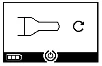 | The device was turned off by the patient. If the device was switched off manually and drug remains, restart the controller. |
| Alternating signal tone and the LCD flashes this symbol. | |||
| 7 | Flashing |  | Bad or missing Connection Cord. Check Connection Cord between Handset and Controller. Bad or missing Aerosol Head. Correct then restart Controller. |
| Alternating signal tone and the LCD flashes this symbol. | |||
| 8 | Flashing | 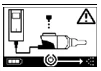 | No ARIKAYCE detected. Add ARIKAYCE. If you have already added ARIKAYCE, gently tap the Handset, hold the Handset level and restart the Controller. |
| Alternating signal tone and the LCD flashes this symbol. | |||
| 9 | Flashing | 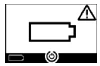 | Empty battery pack, switch to AC power to take or resume treatment, keep A/C power supply plugged in to recharge the battery pack. |
| Alternating signal tone and the LCD flashes this symbol. | |||
| 10 | Flashing | 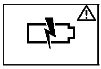 | Battery pack is defective. Switch to AC power to take or resume treatment. Contact the inLighten Patient Support Program at 1-833-LIGHT-00 (1-833-544-4800). |
| Alternating signal tone and the LCD flashes this symbol. | |||
| 11 | Flashing | 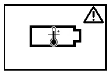 | Battery pack is overheated. Wait until the device cools down or switch to AC power to take or resume treatment. If the problem continues contact the inLighten Patient Support Program at 1-833-LIGHT-00 (1-833-544-4800). |
| Alternating signal tone and the LCD flashes this symbol. | |||
| 12 | Flashing |  | Have reached 20 minute maximum time and will shut down. If ARIKAYCE remains, restart the Controller. After treatment is complete, clean and disinfect the Handset including the Aerosol Head. |
| Lamira beeps low-high 3 times, the LCD displays this symbol and then turns off | |||
| 13 | The Lamira cannot be activated and no screen, and no beep. | Bad or missing A/C Power Supply. Switch to AC power to take or resume treatment, keep power supply plugged in to recharge the battery pack. | |
| 14 | The Lamira stops before ARIKAYCE is completely used up. | Lost power. Switch to AC power to take or resume treatment, keep the A/C power supply plugged in to recharge the battery pack. Tilted Handset. Keep Handset level, gently tap Handset and restart Controller. | |
| 15 | The Lamira does not stop automatically after all ARIKAYCE is consumed. | Clean and disinfect the Aerosol Head. If condition continues, contact the inLighten Patient Support Program at 1-833-LIGHT-00 (1-833-544-4800). | |
| 16 | Longer than normal nebulization time. | Aerosol Head is dirty. Clean and disinfect the Aerosol Head. Replace the Aerosol Head with a new one from your kit after 7 uses. | |
| 17 | Handset leaks. | Make sure Blue Valve is placed correctly in the Handset and the 2 flaps point into the Handset Chamber (see Section H). Make sure Aerosol Head is correctly placed in the Handset. It is normal to have some liquid collect in the Aerosol Chamber and Mouthpiece. The amount depends on the volume of the ARIKAYCE and on your breathing pattern. | |
| 18 | 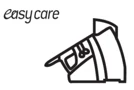 | The On button was accidentally pressed for 10 seconds, which activated the easycare function. The easycare is an accessory that assists in cleaning the Aerosol Head but it is not used for your Lamira. Press the On button briefly to turn-off the Controller and stop the easycare function. | |
M Specifications
| Mechanical | |
| Weight: Controller and Handset | approx. 8.0 oz. |
| Handset Dimensions (W × H × D) | 2.0" × 2.4" × 5.5" |
| Controller Dimensions (L × W × H) | 6.3" × 2.8" × 0.8" |
| Minimum Fill Volume | 0.5 mL |
| Maximum Fill Volume | 8.4 mL |
| Electrical | |
| Electrical Requirements | 110 V - 240 V, 50 Hz/60 Hz |
| Power Wattage | 3.5 Watts under normal load |
| Rechargeable battery-pack (NiMH) | 3.6 V (nominal), 2000 mAh |
| Transport and Storage | |
| Temperature | -13° to 158° F |
| Relative Humidity (non-condensing) | 0% to 93% |
| Air Pressure | 9 to 15 PSI |
| Operational | |
| Temperature | 41° to 104° F |
| Relative Humidity (non-condensing) | 15% to 93% |
| Air Pressure | 10 to 15 PSI |
| Device Classification According to IEC 60601-1 | |
| Type of electric shock protection (A/C Power Supply) | Protection Class II |
| Degree of protection from electric shock of part used (nebulizer) | Type BF |
| Degree of protection against water ingress per IEC 60529 IP rating (controller) | IP 22 |
| Degree of protection when in the presence of flammable mixtures | No protection |
| Continuous operation | Operating mode |
Device Performance Characteristics
| Mean | RangeRange - two-sided tolerance interval, proportion of total population=0.95 | |
|---|---|---|
| Total Delivered Dose by Breath SimulationBreath simulation - tidal volume of 500 mL, 15 breath per minutes, and inhalation:exhalation ratio is 50:50 (mg) | 312.1 | 273.8 – 350.4 |
| Total Delivered Dose by Breath Simulation (% of label claimlabel claim - 590 mg) | 52.9 | 46.4 – 59.4 |
| MMADMMAD - Mass Median Aerodynamic Diameter by NGINGI - Next Generation Impactor (µm) | 4.45 | 4.38 – 4.52 |
| GSDGSD - Geometric Standard Deviation | 1.59 | 1.59 – 1.60 |
| Respiratory Dose by NGI (≤ 5µm, mg) | 327.1 | 316.5 – 337.6 |
| Respiratory Fraction by NGI (≤5µm, % of delivered dose) | 55.6 | 53.8 – 57.4 |
Handset materials
Polypropylene, polyamide, silicone, stainless steel, thermoplastic elastomers. Does not contain any natural rubber (latex).
Disposal
The Lamira components and batteries must be disposed of in accordance with local (state, county or municipal) regulations.
Manufactured by:
PARI Respiratory Equipment, Inc.
2412 PARI Way
Midlothian, Virginia 23112 USA
For patent information: www.PARI.com/ip
©2018 PARI Pharma GmbH. All rights reserved. The PARI logo is a registered trademark of PARI GmbH. Lamira, Altera, eRapid, and eFlow logo are registered trademarks of PARI Pharma GmbH. Insmed, ARIKAYCE, and inLighten are registered trademarks of Insmed Incorporated.
This Instructions for Use has been approved by the U.S. Food and Drug Administration
7/2026
Questions about Lamira? Contact the inLighten Patient Support Program at 1-833-LIGHT-00 (1-833-544-4800)